
Test and share Crystal Trail
- Areas, progress and saving
- 60 minutes
- Advanced Scratch · After Monster Quest
Check every choice, save a working copy and explain the controls.
Recommended preparation: Scratch Monster Quest. Complete Monster Quest or bring equivalent Scratch experience. Build from a blank project, one small pictured action at a time.
Your goal
Test the whole RPG before sharing the finished project.
Try the adventure as a player before changing it. Keep a working copy so you can return to the version you have tested.
Do one step. Match the picture. Then move on.
Select Stage’s thumbnail
Test a complete adventure
Start New Game and type a made-up nickname. Speak to Guide, type YES, then earn all three crystals. Use Heal before health reaches zero. The final portal should show the victory screen.
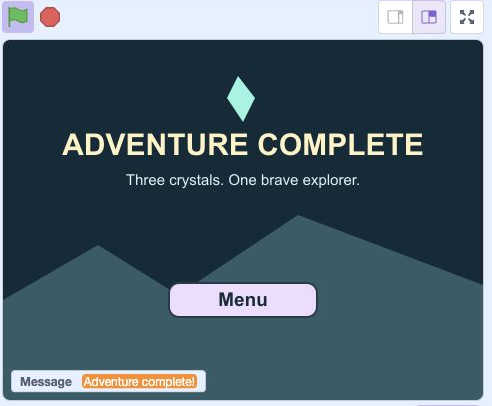
- Click: Run your test with the green flag
- Check: Check the Adventure Complete screen
- Click: Click Menu to play again
Actual Scratch editor · step 1 Select Guide
Test the recovery route
Start another game. Spend your potions, then visit Guide outside battle and type REST. Health should refill and an empty potion supply should become one. You should still be able to finish.
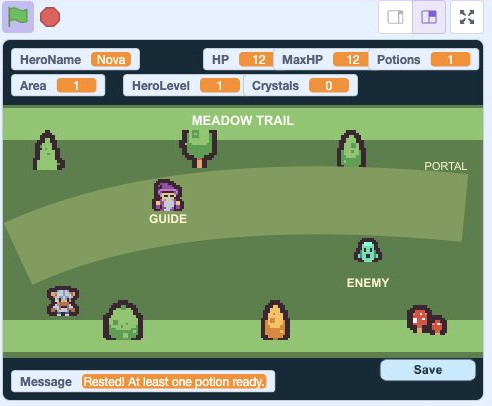
- Click: Run your test with the green flag
- Check: Check the visible game counters
- Check: Read the result in Message
Actual Scratch editor · step 2 Select Stage’s thumbnail
Test a saved victory
Save in a cleared area and copy the code. Return to Menu, choose Continue and enter it. The enemy stays cleared, the next portal stays available, and your hero begins safely with full health.
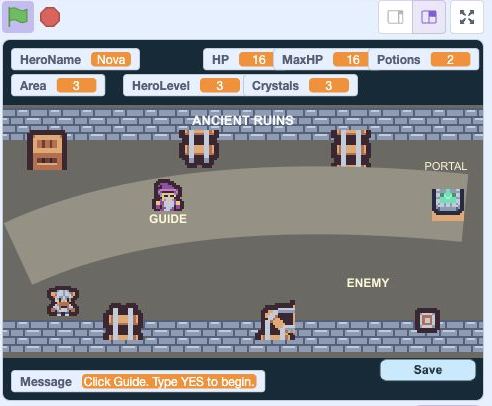
- Click: Run your test with the green flag
- Check: Check the visible game counters
- Check: Read the result in Message
Actual Scratch editor · step 3 Select Stage’s thumbnail
Reject a broken code
From the title screen, try R1035. Its check digit is wrong, so Continue must reject it. Enter your own valid code afterward and check that its area and potion count return.
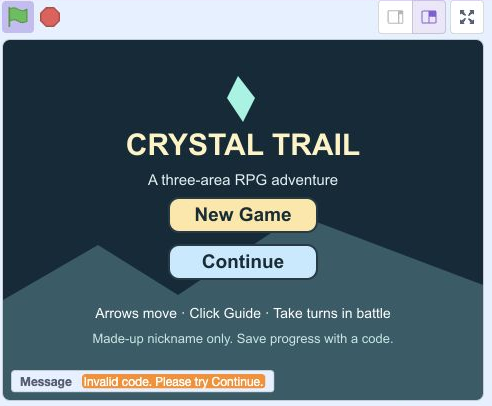
- Click: Run your test with the green flag
- Check: A broken code shows this error
- Click: Click Continue to try a valid code
Actual Scratch editor · step 4 Select Stage’s thumbnail
Save your editable game
Choose File → Save to your computer. Keep the .sb3 file as your editable backup. A progress code saves a player’s adventure; this file saves your code, artwork and project.
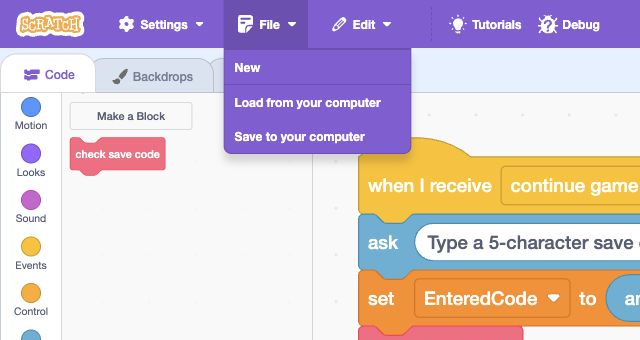
- Click: Open File
- Click: Save to your computer
Actual Scratch editor · step 5 Select Stage’s thumbnail
Explain the controls
Open See Project Page. In Instructions, explain arrow keys, clicking Guide, YES / HINT / REST, Attack / Heal / Run, and saving the displayed code. Say that Continue asks for the nickname again.
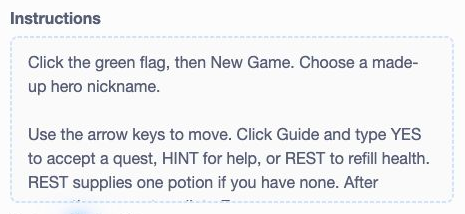
- Click: Write your game controls in Instructions
Actual Scratch editor · step 6 Select Stage’s thumbnail
Credit and share
In Notes and Credits, credit Kenney’s Tiny Dungeon and Tiny Town CC0 artwork. Add the course name. Play once more, then click Share if your Scratch account allows it. Never include your real name.
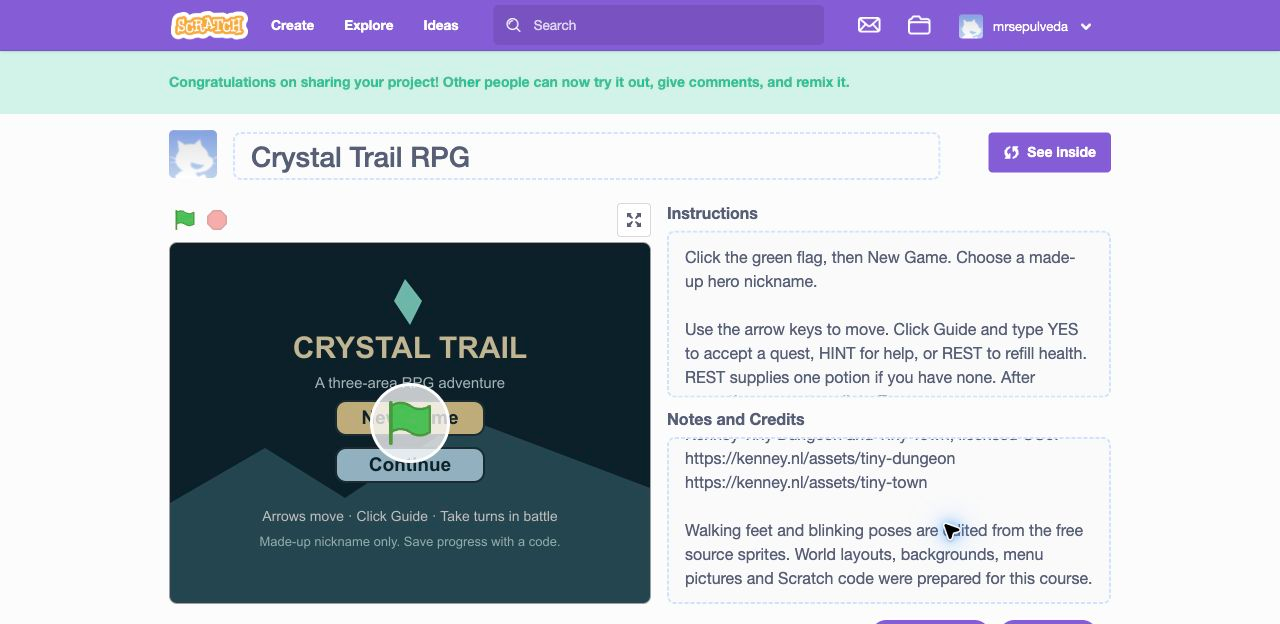
- Check: Keep Kenney’s artwork credits here
- Check: Play your finished adventure once more
Actual Scratch editor · step 7
Optional: full block guide and lesson comparison
Save your own project first. Loading an .sb3 replaces the project on screen. This comparison shows the end of lesson 10.
Download lesson 10 comparison · Download all lesson comparisons
Choose the named sprite in Scratch and read its blocks from top to bottom. Indented rows fit inside the block above. Keep one copy of each existing stack.
StageOpen the title screen
- Eventswhen green flag clicked
- Variablesset [GameState] to (menu)
- Looksswitch backdrop to [Title Screen]
- Variablesset [HeroName] to (Explorer)
- Variablesset [Message] to ()
- Variablesset [QuestReady] to (0)
- Variablesset [Area] to (1)
- Variablesset [Cleared] to (0)
- Variablesset [MaxHP] to ((10) + ((2) * (Area)))
- Variablesset [Power] to ((Area) + (2))
- Variablesset [HP] to (MaxHP)
- Variablesset [EnemyHP] to (0)
- Variablesset [EnemyPower] to (0)
- Variablesset [Potions] to (3)
- Variablesset [HeroLevel] to (1)
- Variablesset [Crystals] to (0)
- Variablesset [SavedCode] to ()
- Variablesset [EnteredCode] to ()
- Variablesset [CodeValid] to (0)
- Variablesset [CheckDigit] to (0)
- Variablesset [DigitIndex] to (2)
- Variableshide variable [SavedCode]
StageReset progress and begin
- Eventswhen I receive [new game]
- Variablesset [QuestReady] to (0)
- Variablesset [Area] to (1)
- Variablesset [Cleared] to (0)
- Variablesset [MaxHP] to ((10) + ((2) * (Area)))
- Variablesset [Power] to ((Area) + (2))
- Variablesset [HP] to (MaxHP)
- Variablesset [EnemyHP] to (0)
- Variablesset [EnemyPower] to (0)
- Variablesset [Potions] to (3)
- Variablesset [HeroLevel] to (1)
- Variablesset [Crystals] to (0)
- Eventsbroadcast [ask hero name] and wait
- Eventsbroadcast [load area] and wait
- Variablesset [GameState] to (explore)
StageShow the current area
- Eventswhen I receive [load area]
- Controlif <Area = 1> then
- Looksswitch backdrop to [Meadow Trail]
- elseSecond slot of the same if/else blockControlif <Area = 2> then
- Looksswitch backdrop to [Crystal Cavern]
- elseSecond slot of the same if/else blockLooksswitch backdrop to [Ancient Ruins]
- Variablesset [Message] to (Click Guide. Type YES to begin.)
- Variablesset [HeroLevel] to (Area)
- Variablesset [Crystals] to (((Area) - (1)) + (Cleared))
StageAsk for a short hero nickname
- Eventswhen I receive [ask hero name]
- Variablesset [GameState] to (naming)
- Sensingask [Choose a made-up hero nickname (1–12 letters).] and wait
- Variablesset [HeroName] to (answer)
- Controlif <<length of [HeroName] = 0> or <length of [HeroName] > 12>> then
- Variablesset [HeroName] to (Explorer)
StageShow information only while playing
- Eventswhen green flag clicked
- Controlforever
- Controlif <<<GameState = explore> or <GameState = dialogue>> or <<<GameState = battle> or <GameState = turn>> or <GameState = save>>> then
- Variablesshow variable [HeroName]
- Variablesshow variable [HP]
- Variablesshow variable [MaxHP]
- Variablesshow variable [Potions]
- Variablesshow variable [Area]
- Variablesshow variable [HeroLevel]
- Variablesshow variable [Crystals]
- elseSecond slot of the same if/else blockVariableshide variable [HeroName]
- Variableshide variable [HP]
- Variableshide variable [MaxHP]
- Variableshide variable [Potions]
- Variableshide variable [Area]
- Variableshide variable [HeroLevel]
- Variableshide variable [Crystals]
- Controlif <not <Message = >> then
- Variablesshow variable [Message]
- elseSecond slot of the same if/else blockVariableshide variable [Message]
- Controlif <<GameState = battle> or <GameState = turn>> then
- Variablesshow variable [EnemyHP]
- elseSecond slot of the same if/else blockVariableshide variable [EnemyHP]
- Controlif <GameState = save> then
- Variablesshow variable [SavedCode]
- elseSecond slot of the same if/else blockVariableshide variable [SavedCode]
StageSet up a fair battle
- Eventswhen I receive [start battle]
- Variablesset [GameState] to (turn)
- Variablesset [EnemyHP] to ((8) * (Area))
- Variablesset [EnemyPower] to ((Area) + (1))
- Looksswitch backdrop to [Battle Arena]
- Variablesset [Message] to (Choose one battle action.)
- Variablesset [GameState] to (battle)
StageAttack once, then give the enemy a turn
- Eventswhen I receive [hero attack]
- Variableschange [EnemyHP] by ((0) - (Power))
- Controlif <EnemyHP < 0> then
- Variablesset [EnemyHP] to (0)
- Variablesset [Message] to (Your hero attacks!)
- Eventsbroadcast [enemy hurt] and wait
- Controlif <EnemyHP < 1> then
- Eventsbroadcast [battle won]
- elseSecond slot of the same if/else blockEventsbroadcast [enemy turn]
StageResolve one enemy attack
- Eventswhen I receive [enemy turn]
- Controlwait (0.25) seconds
- Variableschange [HP] by ((0) - (EnemyPower))
- Controlif <HP < 0> then
- Variablesset [HP] to (0)
- Variablesset [Message] to (The enemy strikes back!)
- Eventsbroadcast [hero hurt] and wait
- Controlif <HP < 1> then
- Variablesset [GameState] to (lost)
- Looksswitch backdrop to [Try Again]
- elseSecond slot of the same if/else blockVariablesset [Message] to (Your turn: Attack, Heal or Run.)
- Variablesset [GameState] to (battle)
StageClear the area once
- Eventswhen I receive [battle won]
- Variablesset [Cleared] to (1)
- Variablesset [QuestReady] to (0)
- Variablesset [Crystals] to (Area)
- Eventsbroadcast [load area] and wait
- Variablesset [Message] to (Crystal earned! Walk to Portal.)
- Variablesset [GameState] to (explore)
StageUse one potion and give the enemy a turn
- Eventswhen I receive [heal hero]
- Variableschange [Potions] by (-1)
- Variableschange [HP] by (6)
- Controlif <HP > MaxHP> then
- Variablesset [HP] to (MaxHP)
- Variablesset [Message] to (Potion restores up to 6 HP.)
- Controlwait (0.3) seconds
- Eventsbroadcast [enemy turn]
StageRetreat without earning a crystal
- Eventswhen I receive [run away]
- Eventsbroadcast [load area] and wait
- Variablesset [Message] to (Retreated. HP and potions stay.)
- Variablesset [GameState] to (explore)
StageReturn to the title screen
- Eventswhen I receive [show menu]
- Variablesset [GameState] to (menu)
- Looksswitch backdrop to [Title Screen]
- Variablesset [Message] to ()
StageTravel onward or finish the adventure
- Eventswhen I receive [next area]
- Controlif <Area < 3> then
- Variableschange [Area] by (1)
- Variablesset [Cleared] to (0)
- Variablesset [QuestReady] to (0)
- Variablesset [MaxHP] to ((10) + ((2) * (Area)))
- Variablesset [Power] to ((Area) + (2))
- Variablesset [HP] to (MaxHP)
- Eventsbroadcast [load area] and wait
- Variablesset [GameState] to (explore)
- elseSecond slot of the same if/else blockVariablesset [GameState] to (won)
- Variablesset [Message] to (Adventure complete!)
- Looksswitch backdrop to [Adventure Complete]
StageFreeze and make a five-character save code
- Eventswhen I receive [save game]
- Variablesset [SavedCode] to (R)
- Variablesset [SavedCode] to (join [SavedCode] [Area])
- Variablesset [SavedCode] to (join [SavedCode] [Cleared])
- Variablesset [SavedCode] to (join [SavedCode] [Potions])
- Variablesset [CheckDigit] to (((Area) + ((Cleared) + (Potions))) mod (10))
- Variablesset [SavedCode] to (join [SavedCode] [CheckDigit])
- Variablesset [Message] to (Write down code. Then Resume.)
StageResume at the same position
- Eventswhen I receive [resume game]
- Variablesset [Message] to (Click Guide for YES, HINT or REST.)
- Variablesset [GameState] to (explore)
StageCheck a code before changing progress
- My Blocksdefine check save code
- Variablesset [CodeValid] to (1)
- Controlif <not <<length of [EnteredCode] = 5> and <letter (1) of [EnteredCode] = R>>> then
- Variablesset [CodeValid] to (0)
- Variablesset [CheckDigit] to (0)
- Variablesset [DigitIndex] to (2)
- Controlrepeat (3)
- Controlif <not <[0123456789] contains [letter (DigitIndex) of [EnteredCode]]?>> then
- Variablesset [CodeValid] to (0)
- Variableschange [CheckDigit] by (letter (DigitIndex) of [EnteredCode])
- Variableschange [DigitIndex] by (1)
- Controlif <not <[0123456789] contains [letter (5) of [EnteredCode]]?>> then
- Variablesset [CodeValid] to (0)
- Controlif <not <<letter (2) of [EnteredCode] > 0> and <letter (2) of [EnteredCode] < 4>>> then
- Variablesset [CodeValid] to (0)
- Controlif <not <<letter (3) of [EnteredCode] > -1> and <letter (3) of [EnteredCode] < 2>>> then
- Variablesset [CodeValid] to (0)
- Controlif <not <<letter (4) of [EnteredCode] > -1> and <letter (4) of [EnteredCode] < 4>>> then
- Variablesset [CodeValid] to (0)
- Controlif <not <letter (5) of [EnteredCode] = (CheckDigit) mod (10)>> then
- Variablesset [CodeValid] to (0)
StageRestore a valid safe checkpoint
- Eventswhen I receive [continue game]
- Sensingask [Type a 5-character save code, such as R1034.] and wait
- Variablesset [EnteredCode] to (answer)
- My Blockscheck save code
- Controlif <CodeValid = 1> then
- Variablesset [Area] to (letter (2) of [EnteredCode])
- Variablesset [Cleared] to (letter (3) of [EnteredCode])
- Variablesset [Potions] to (letter (4) of [EnteredCode])
- Variablesset [QuestReady] to (0)
- Variablesset [MaxHP] to ((10) + ((2) * (Area)))
- Variablesset [Power] to ((Area) + (2))
- Variablesset [HP] to (MaxHP)
- Eventsbroadcast [ask hero name] and wait
- Eventsbroadcast [load area] and wait
- Variablesset [GameState] to (explore)
- elseSecond slot of the same if/else blockVariablesset [Message] to (Invalid code. Please try Continue.)
- Variablesset [GameState] to (menu)
StartShow New Game on the title screen
- Eventswhen green flag clicked
- Controlforever
- Controlif <GameState = menu> then
- Looksshow
- elseSecond slot of the same if/else blockLookshide
StartLock New Game before starting
- Eventswhen this sprite clicked
- Controlif <GameState = menu> then
- Variablesset [GameState] to (loading)
- Eventsbroadcast [new game]
HeroPlace the hero at a safe starting point
- Eventswhen I receive [load area]
- Looksclear graphic effects
- Motiongo to x: (-180) y: (-80)
- Variablesset [XSpeed] to (0)
- Variablesset [YSpeed] to (0)
- Variablesset [AnimTicks] to (0)
- Looksswitch costume to [Stand]
- Motionset rotation style [left-right]
- Motionpoint in direction (90)
HeroShow the hero only inside the adventure
- Eventswhen green flag clicked
- Controlforever
- Controlif <<<GameState = explore> or <GameState = dialogue>> or <<<GameState = battle> or <GameState = turn>> or <GameState = save>>> then
- Looksshow
- elseSecond slot of the same if/else blockLookshide
HeroRead arrow keys and move in four directions
- Eventswhen green flag clicked
- Controlforever
- Controlif <GameState = explore> then
- Variablesset [XSpeed] to (0)
- Variablesset [YSpeed] to (0)
- Controlif <key [left arrow] pressed?> then
- Variableschange [XSpeed] by (-4)
- Controlif <key [right arrow] pressed?> then
- Variableschange [XSpeed] by (4)
- Controlif <key [up arrow] pressed?> then
- Variableschange [YSpeed] by (4)
- Controlif <key [down arrow] pressed?> then
- Variableschange [YSpeed] by (-4)
- Motionchange x by (XSpeed)
- Motionchange y by (YSpeed)
- My Blocksstay on map
HeroStay inside the map
- My Blocksdefine stay on map
- Controlif <x position > 215> then
- Motionset x to (215)
- Controlif <x position < -215> then
- Motionset x to (-215)
- Controlif <y position > 85> then
- Motionset y to (85)
- Controlif <y position < -120> then
- Motionset y to (-120)
HeroFace the way you move and animate your feet
- Eventswhen green flag clicked
- Controlforever
- Controlif <GameState = explore> then
- Controlif <XSpeed < 0> then
- Motionpoint in direction (-90)
- Controlif <XSpeed > 0> then
- Motionpoint in direction (90)
- Controlif <<XSpeed = 0> and <YSpeed = 0>> then
- Looksswitch costume to [Stand]
- Variablesset [AnimTicks] to (0)
- elseSecond slot of the same if/else blockVariableschange [AnimTicks] by (1)
- Controlif <AnimTicks > 3> then
- Looksnext costume
- Variablesset [AnimTicks] to (0)
HeroStand on the left for battle
- Eventswhen I receive [start battle]
- Motiongo to x: (-105) y: (-15)
- Looksswitch costume to [Stand]
- Motionpoint in direction (90)
HeroBegin a quest battle by touching the enemy
- Eventswhen green flag clicked
- Controlforever
- Controlif <<GameState = explore> and <<<QuestReady = 1> and <Cleared = 0>> and <touching [Enemy]?>>> then
- Variablesset [GameState] to (loading battle)
- Eventsbroadcast [start battle]
HeroFlash when the enemy hits
- Eventswhen I receive [hero hurt]
- Looksset [color] effect to (40)
- Motionchange x by (-6)
- Controlwait (0.12) seconds
- Motionchange x by (6)
- Looksclear graphic effects
HeroEnter the portal after earning a crystal
- Eventswhen green flag clicked
- Controlforever
- Controlif <<GameState = explore> and <<Cleared = 1> and <touching [Portal]?>>> then
- Variablesset [GameState] to (travel)
- Eventsbroadcast [next area]
GuidePlace the guide beside the path
- Eventswhen I receive [load area]
- Motiongo to x: (-75) y: (25)
GuideShow the guide on the map
- Eventswhen green flag clicked
- Controlforever
- Controlif <<<GameState = explore> or <GameState = dialogue>> or <GameState = save>> then
- Looksshow
- elseSecond slot of the same if/else blockLookshide
GuideListen to the player’s typed choice
- Eventswhen this sprite clicked
- Controlif <GameState = explore> then
- Variablesset [GameState] to (dialogue)
- Sensingask [Type YES for quest, HINT for help, or REST to recover.] and wait
- Controlif <answer = YES> then
- Controlif <Cleared = 0> then
- Variablesset [QuestReady] to (1)
- Variablesset [Message] to (Walk to the monster to battle.)
- elseSecond slot of the same if/else blockVariablesset [Message] to (Area clear. Walk to Portal.)
- elseSecond slot of the same if/else blockControlif <answer = HINT> then
- Variablesset [Message] to (Arrows move. Touch foe after YES.)
- elseSecond slot of the same if/else blockControlif <answer = REST> then
- Variablesset [HP] to (MaxHP)
- Controlif <Potions = 0> then
- Variablesset [Potions] to (1)
- Variablesset [Message] to (Rested! At least one potion ready.)
- elseSecond slot of the same if/else blockVariablesset [Message] to (Try YES, HINT or REST.)
- Variablesset [GameState] to (explore)
EnemyChoose the monster for this area
- Eventswhen I receive [load area]
- Looksclear graphic effects
- Motiongo to x: (125) y: (-30)
- Variablesset [AnimTicks] to (0)
- Controlif <Area = 1> then
- Looksswitch costume to [Slime 1]
- elseSecond slot of the same if/else blockControlif <Area = 2> then
- Looksswitch costume to [Skeleton 1]
- elseSecond slot of the same if/else blockLooksswitch costume to [Bat 1]
EnemyHide a defeated enemy
- Eventswhen green flag clicked
- Controlforever
- Controlif <<<<<GameState = explore> or <GameState = dialogue>> or <GameState = save>> and <Cleared = 0>> or <<GameState = battle> or <GameState = turn>>> then
- Looksshow
- elseSecond slot of the same if/else blockLookshide
EnemyBlink while waiting for the hero
- Eventswhen green flag clicked
- Controlforever
- Controlif <<GameState = explore> or <GameState = battle>> then
- Variableschange [AnimTicks] by (1)
- Controlif <AnimTicks = 18> then
- Looksnext costume
- Controlif <AnimTicks > 21> then
- Controlif <Area = 1> then
- Looksswitch costume to [Slime 1]
- elseSecond slot of the same if/else blockControlif <Area = 2> then
- Looksswitch costume to [Skeleton 1]
- elseSecond slot of the same if/else blockLooksswitch costume to [Bat 1]
- Variablesset [AnimTicks] to (0)
EnemyFace the hero across the battle arena
- Eventswhen I receive [start battle]
- Motiongo to x: (105) y: (-15)
- Controlif <Area = 1> then
- Looksswitch costume to [Slime 1]
- elseSecond slot of the same if/else blockControlif <Area = 2> then
- Looksswitch costume to [Skeleton 1]
- elseSecond slot of the same if/else blockLooksswitch costume to [Bat 1]
EnemyFlash and recoil when hit
- Eventswhen I receive [enemy hurt]
- Looksset [color] effect to (40)
- Motionchange x by (6)
- Controlwait (0.12) seconds
- Motionchange x by (-6)
- Looksclear graphic effects
PortalPlace the portal at the right edge
- Eventswhen I receive [load area]
- Motiongo to x: (205) y: (15)
PortalShow the portal only after the battle is won
- Eventswhen green flag clicked
- Controlforever
- Controlif <<<<GameState = explore> or <GameState = dialogue>> or <GameState = save>> and <Cleared = 1>> then
- Looksshow
- elseSecond slot of the same if/else blockLookshide
AttackShow Attack when it can be used
- Eventswhen green flag clicked
- Controlforever
- Controlif <GameState = battle> then
- Looksshow
- elseSecond slot of the same if/else blockLookshide
AttackUse Attack once per turn
- Eventswhen this sprite clicked
- Controlif <GameState = battle> then
- Variablesset [GameState] to (turn)
- Eventsbroadcast [hero attack]
HealShow Heal when it can be used
- Eventswhen green flag clicked
- Controlforever
- Controlif <GameState = battle> then
- Looksshow
- elseSecond slot of the same if/else blockLookshide
HealUse Heal once per turn
- Eventswhen this sprite clicked
- Controlif <GameState = battle> then
- Controlif <<Potions > 0> and <HP < MaxHP>> then
- Variablesset [GameState] to (turn)
- Eventsbroadcast [heal hero]
- elseSecond slot of the same if/else blockVariablesset [Message] to (Need missing HP and a potion.)
RunShow Run when it can be used
- Eventswhen green flag clicked
- Controlforever
- Controlif <GameState = battle> then
- Looksshow
- elseSecond slot of the same if/else blockLookshide
RunUse Run once per turn
- Eventswhen this sprite clicked
- Controlif <GameState = battle> then
- Variablesset [GameState] to (retreat)
- Eventsbroadcast [run away]
MenuShow Menu when it can be used
- Eventswhen green flag clicked
- Controlforever
- Controlif <<<GameState = lost> or <GameState = won>> or <GameState = save>> then
- Looksshow
- elseSecond slot of the same if/else blockLookshide
MenuKeep Menu clear of the save code
- Eventswhen green flag clicked
- Controlforever
- Controlif <GameState = save> then
- Motiongo to x: (155) y: (-125)
- elseSecond slot of the same if/else blockMotiongo to x: (0) y: (-80)
MenuUse Menu once per turn
- Eventswhen this sprite clicked
- Controlif <<<GameState = lost> or <GameState = won>> or <GameState = save>> then
- Variablesset [GameState] to (leaving)
- Eventsbroadcast [show menu]
SaveShow Save when it can be used
- Eventswhen green flag clicked
- Controlforever
- Controlif <GameState = explore> then
- Looksshow
- elseSecond slot of the same if/else blockLookshide
SaveUse Save once per turn
- Eventswhen this sprite clicked
- Controlif <GameState = explore> then
- Variablesset [GameState] to (save)
- Eventsbroadcast [save game]
ResumeShow Resume when it can be used
- Eventswhen green flag clicked
- Controlforever
- Controlif <GameState = save> then
- Looksshow
- elseSecond slot of the same if/else blockLookshide
ResumeUse Resume once per turn
- Eventswhen this sprite clicked
- Controlif <GameState = save> then
- Variablesset [GameState] to (resuming)
- Eventsbroadcast [resume game]
ContinueShow Continue when it can be used
- Eventswhen green flag clicked
- Controlforever
- Controlif <GameState = menu> then
- Looksshow
- elseSecond slot of the same if/else blockLookshide
ContinueUse Continue once per turn
- Eventswhen this sprite clicked
- Controlif <GameState = menu> then
- Variablesset [GameState] to (loading)
- Eventsbroadcast [continue game]
Ready for the next step?
Return here anytime to review.
Finished project
Crystal Trail RPG
Name an animated hero, explore three areas, talk to the guide and face a different enemy in each area. Choose Attack, Heal or Run during turn-based battles. Record a five-character save code, then use Continue to restart safely in the saved area with full health and your saved progress and potions.
Compare this working example with your own project. It opens in a new tab.
Lesson discussion
Ask a question or help a classmate. Mr. S can reply here.
Loading discussion…