
Follow the trail through three areas
- Areas, progress and saving
- 90 minutes
- Advanced Scratch · After Monster Quest
Earn crystals and unlock the next part of the adventure.
Recommended preparation: Scratch Monster Quest. Complete Monster Quest or bring equivalent Scratch experience. Build from a blank project, one small pictured action at a time.
Your goal
Keep one enemy defeat per area and carry progress into the next area.
Each area has one crystal to earn. A cleared flag remembers a victory, so returning to a defeated enemy cannot give another crystal.
Do one step. Match the picture. Then move on.
Select Stage’s thumbnail
Upload the cavern
Select Stage → Backdrops. Upload cavern-backdrop.png. Rename it Crystal Cavern. This will be area 2.
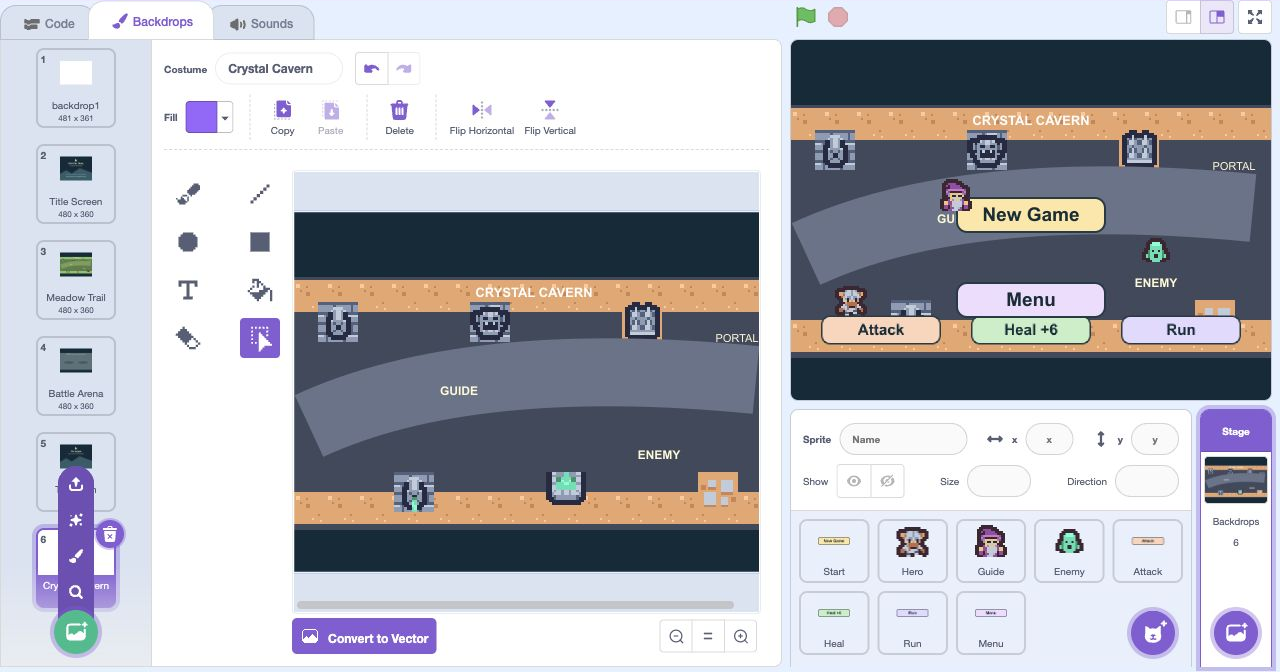
- Click: Open Backdrops
- Click: Point at Choose a Backdrop
- Click: Click Upload Backdrop
- Click: Rename this picture
Actual Scratch editor · step 1 Select Stage’s thumbnail
Upload the ruins
Upload ruins-backdrop.png as another backdrop. Rename it Ancient Ruins. This will be area 3.
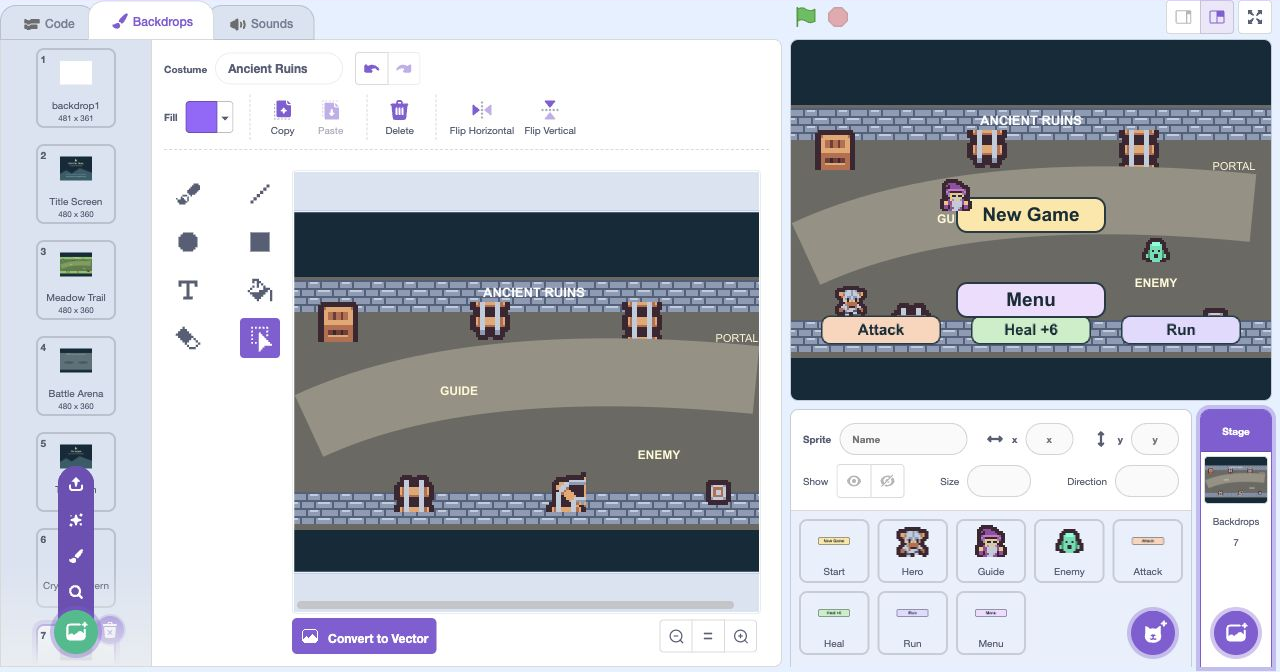
- Click: Open Backdrops
- Click: Point at Choose a Backdrop
- Click: Click Upload Backdrop
- Click: Rename this picture
Actual Scratch editor · step 2 Select Stage’s thumbnail
Upload the victory screen
Upload win-screen.png as another backdrop. Rename it Adventure Complete. You will show this after earning the final crystal.
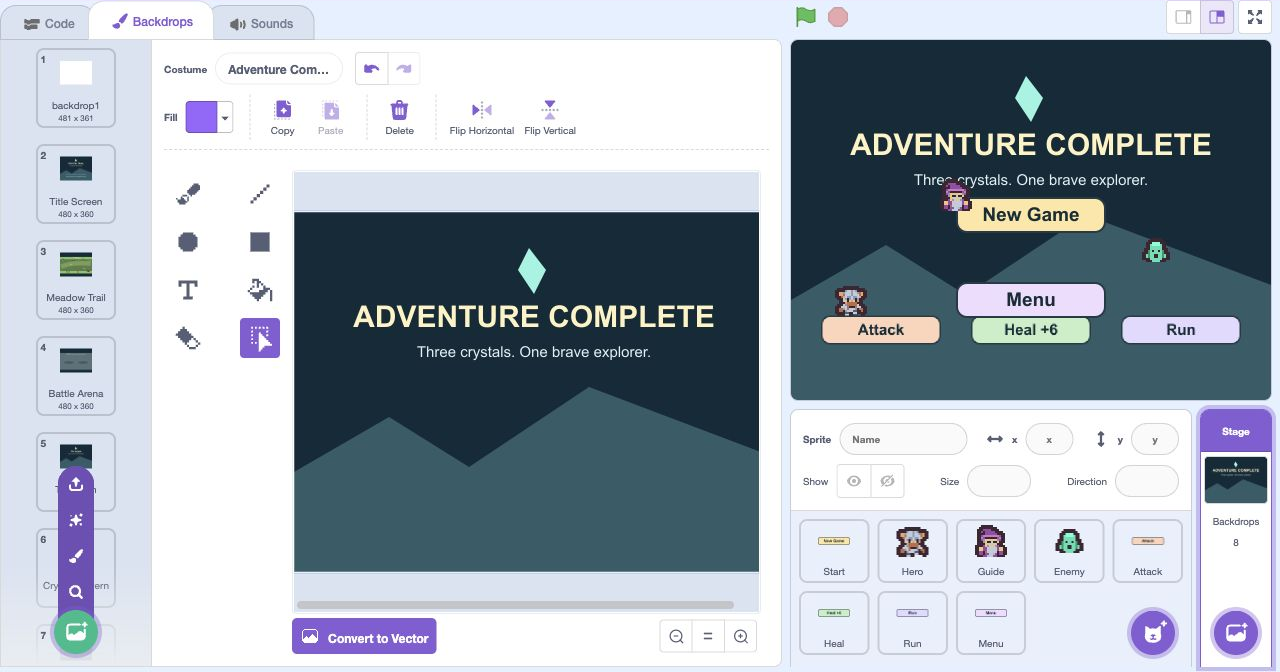
- Click: Open Backdrops
- Click: Point at Choose a Backdrop
- Click: Click Upload Backdrop
- Click: Rename this picture
Actual Scratch editor · step 3 Select Enemy
Add the skeleton’s first costume
Select Enemy → Costumes. Upload skeleton-idle.png. Rename it Skeleton 1. Add it to Enemy, not as a separate sprite.
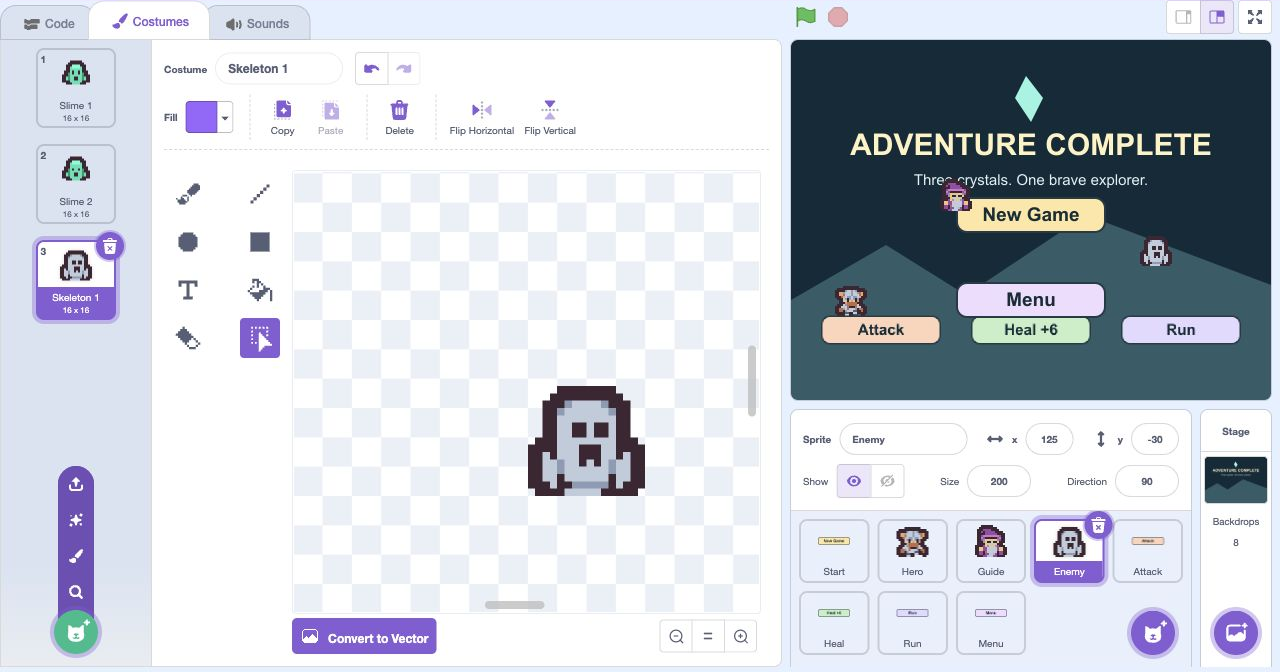
- Click: Open Costumes
- Click: Point at Choose a Costume
- Click: Click Upload Costume
- Click: Rename this picture
Actual Scratch editor · step 4 Select Enemy
Add the skeleton’s second costume
Upload skeleton-blink.png as another Enemy costume. Rename it Skeleton 2. Keep the two Slime costumes.
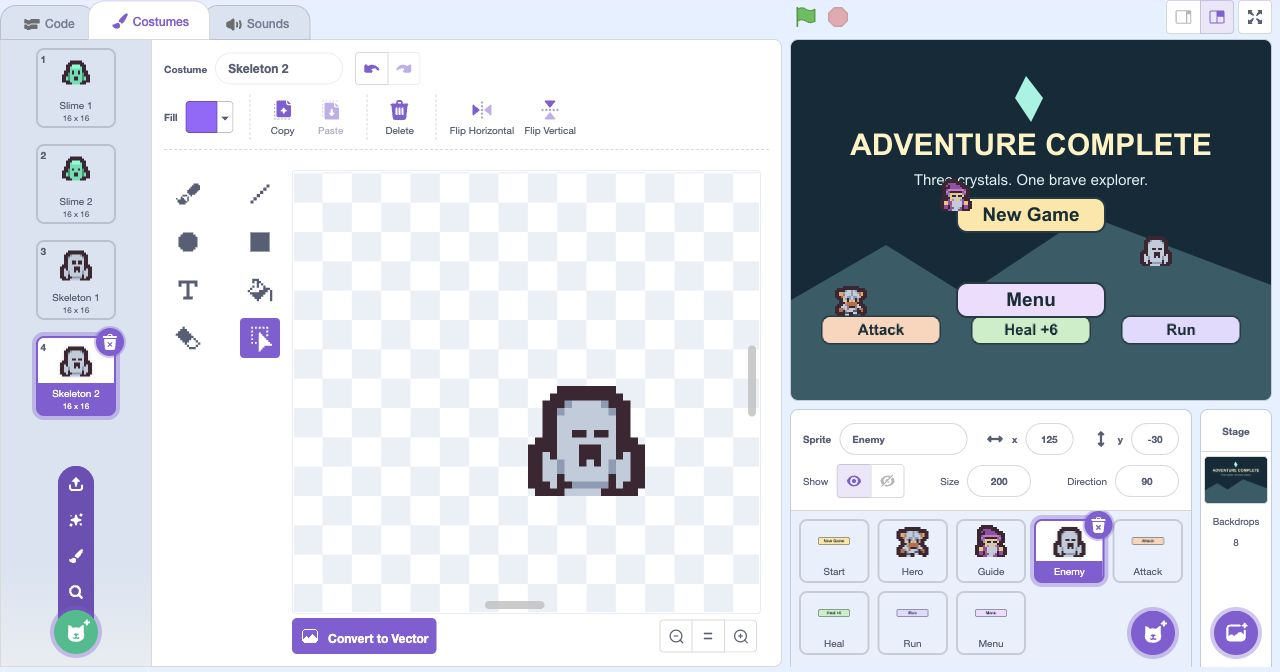
- Click: Open Costumes
- Click: Point at Choose a Costume
- Click: Click Upload Costume
- Click: Rename this picture
Actual Scratch editor · step 5 Select Enemy
Add the bat’s first costume
Upload bat-idle.png as another Enemy costume. Rename it Bat 1. The final area will use this enemy.
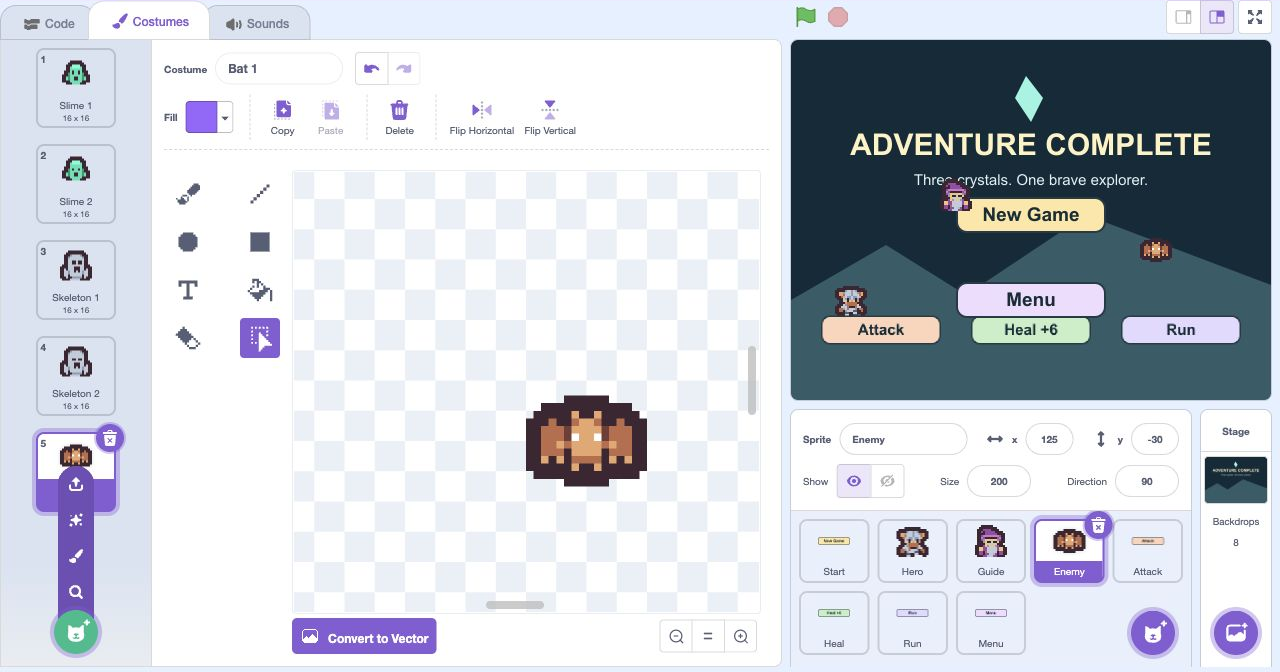
- Click: Open Costumes
- Click: Point at Choose a Costume
- Click: Click Upload Costume
- Click: Rename this picture
Actual Scratch editor · step 6 Select Enemy
Add the bat’s second costume
Upload bat-blink.png as another Enemy costume. Rename it Bat 2. Enemy should now have six costumes.
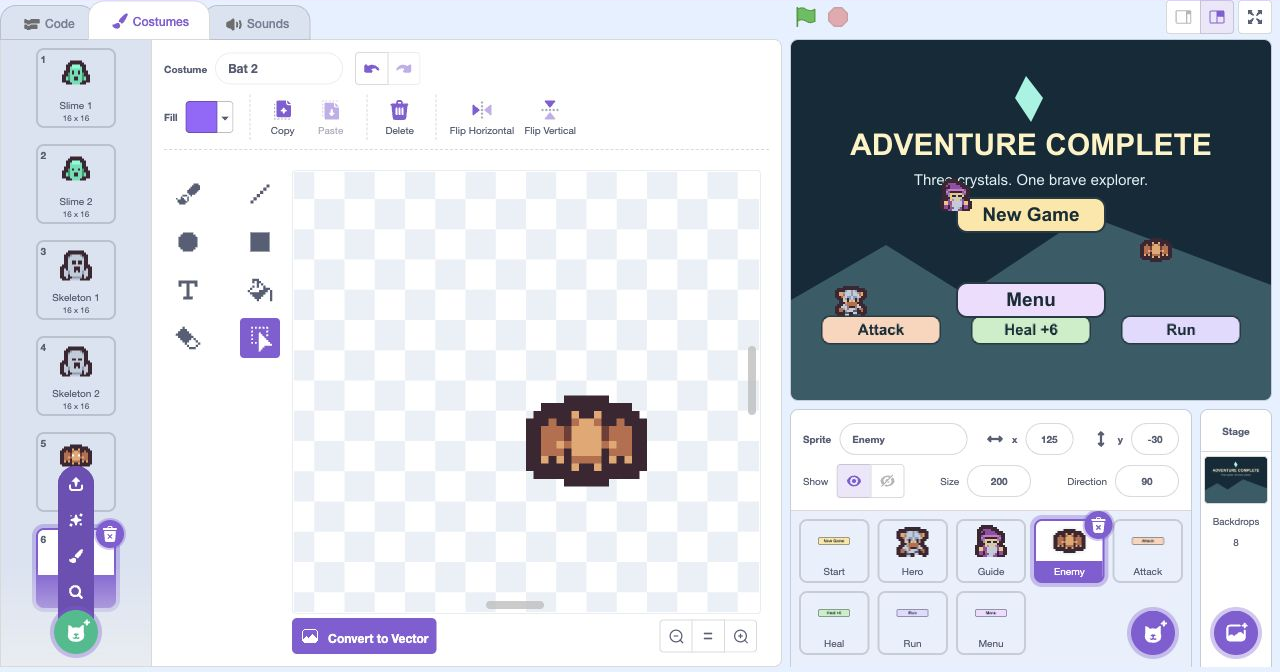
- Click: Open Costumes
- Click: Point at Choose a Costume
- Click: Click Upload Costume
- Click: Rename this picture
Actual Scratch editor · step 7 Add Portal
Upload the portal
Upload portal.png as a new sprite. Rename it Portal. A cleared area will reveal the route onward.
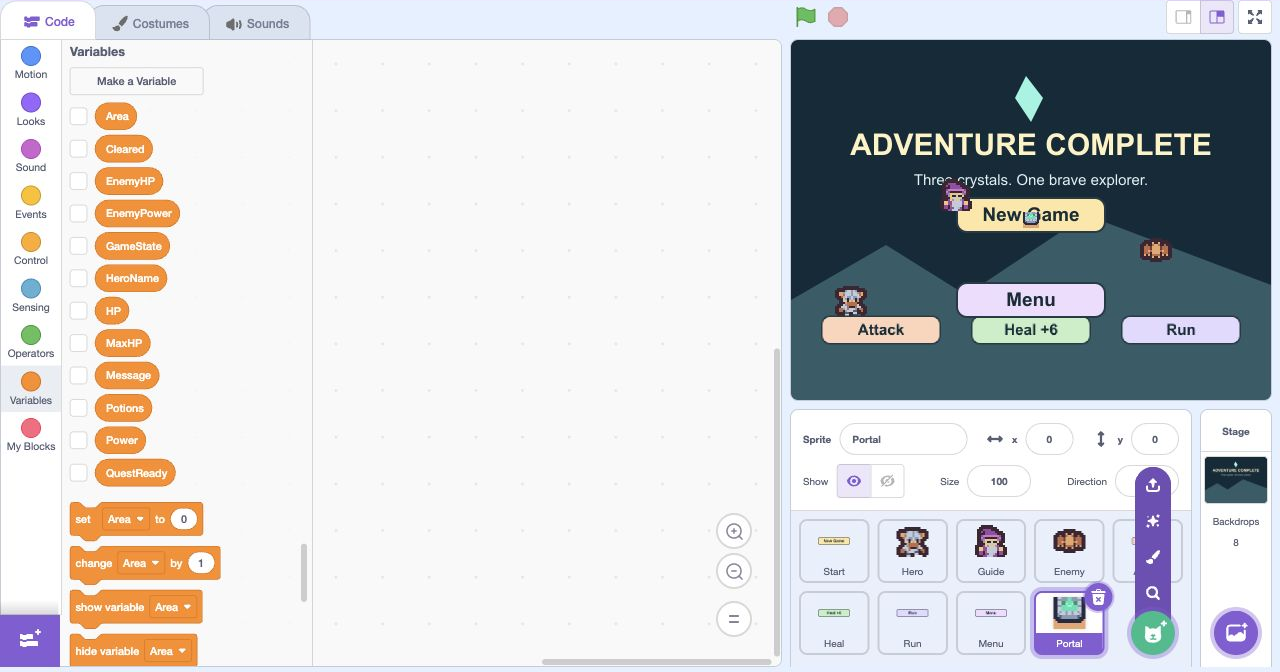
- Click: Point at Choose a Sprite
- Click: Click Upload Sprite
Actual Scratch editor · step 8 Select Portal
Place Portal
Select Portal. Set x to 205, y to 15, size to 200 and rotation style to do not rotate. It stands near the right edge of the path.
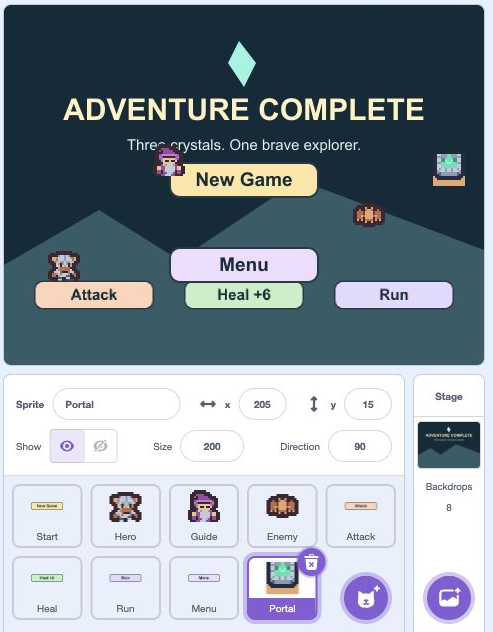
- Click: Set the pictured x and y
- Click: Set the pictured size
- Click: Open Direction to choose no rotation
Actual Scratch editor · step 9 Select Stage’s thumbnail
Create the progress counters
Create HeroLevel and Crystals, each For all sprites. Uncheck their monitors for now. Area tells us the map; HeroLevel and Crystals let the player see their progress.
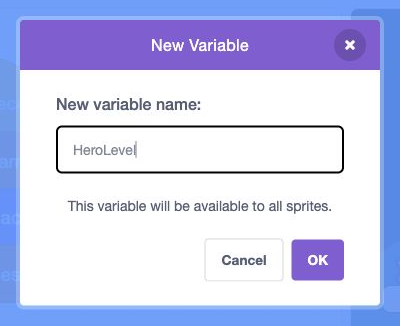
- Click: Type the variable name
- Check: This variable is shared by all sprites
- Click: Click OK
Actual Scratch editor · step 10 Select Stage’s thumbnail
Reset visible progress
Select Stage. Add set HeroLevel to 1 and set Crystals to 0 at the bottom of the green-flag reset stack.
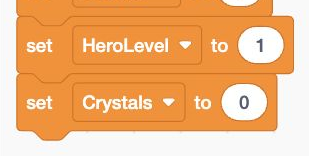
- Add: Add or update the highlighted blocks
Actual Scratch editor · step 11 Select Stage’s thumbnail
Reset progress for New Game
Add those same two progress resets to Stage’s new game stack, just after set Potions to 3. Keep ask hero name and load area below them.
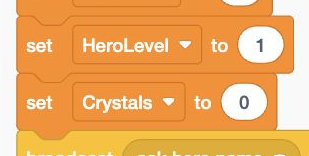
- Add: Add or update the highlighted blocks
Actual Scratch editor · step 12 Select Stage’s thumbnail
Choose the right area background
In Stage’s load area stack, replace switch backdrop to Meadow Trail with the pictured if / else. Area 1 uses Meadow Trail; otherwise test Area 2 for Crystal Cavern, with Ancient Ruins in the final else.
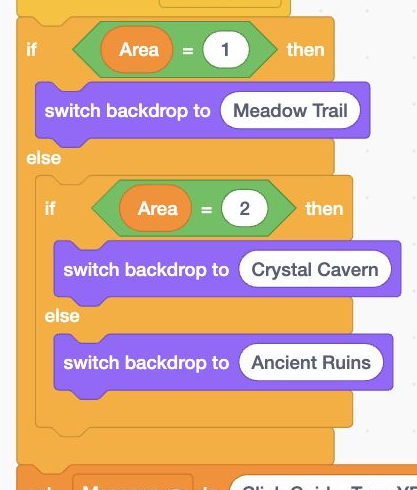
- Add: Add or update the highlighted blocks
Actual Scratch editor · step 13 Select Stage’s thumbnail
Calculate progress when an area loads
At the bottom of that stack, set HeroLevel to Area, then set Crystals to (Area − 1) + Cleared. Earlier completed areas each count as one crystal.
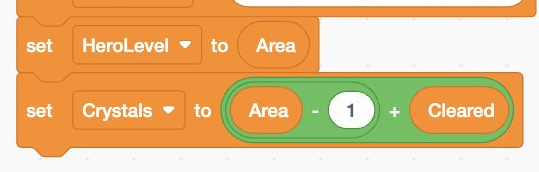
- Add: Build these blocks in this order
Actual Scratch editor · step 14 Select Stage’s thumbnail
Show the progress counters
In Stage’s information loop, add show variable Area, HeroLevel and Crystals beside the existing show-variable blocks. Keep them in the first slot of the playing-state if.
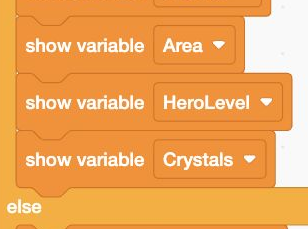
- Add: Add or update the highlighted blocks
Actual Scratch editor · step 15 Select Stage’s thumbnail
Hide progress outside the adventure
Add hide variable Area, HeroLevel and Crystals to the matching else slot. Keep the separate Message and EnemyHP checks below this if.
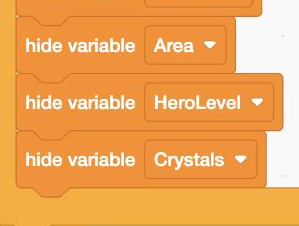
- Add: Add or update the highlighted blocks
Actual Scratch editor · step 16 Select Enemy
Choose the area’s enemy
Select Enemy’s load area stack. Replace its single costume block with the pictured nested if / else: Area 1 → Slime 1; Area 2 → Skeleton 1; otherwise → Bat 1.
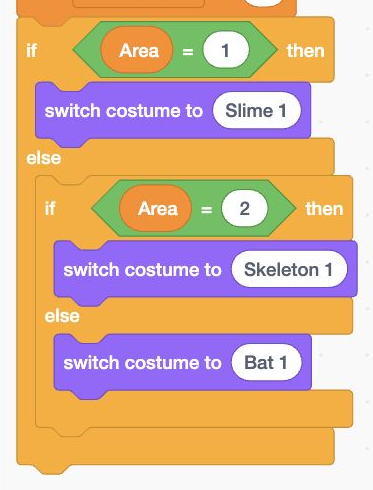
- Add: Add or update the highlighted blocks
Actual Scratch editor · step 17 Select Enemy
Return blinking to the right enemy
In Enemy’s animation loop, replace switch costume to Slime 1 with the same three-area costume choice. Keep it inside if AnimTicks > 21, before resetting AnimTicks to 0.
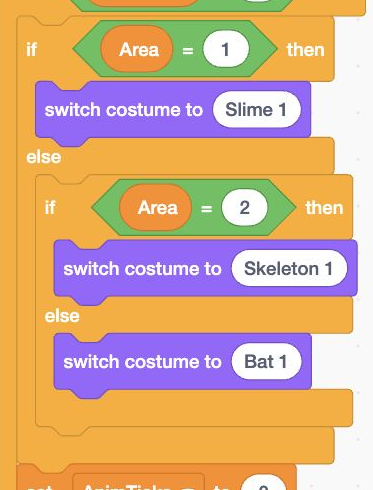
- Add: Add or update the highlighted blocks
Actual Scratch editor · step 18 Select Enemy
Keep the correct enemy in battle
In Enemy’s start battle stack, replace the Slime 1 costume block with that same three-area costume choice. Keep go to x: 105 y: −15 first.
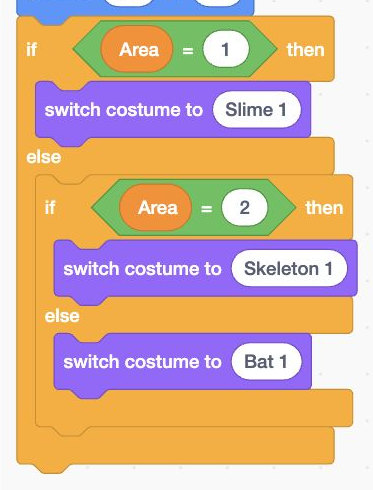
- Add: Add or update the highlighted blocks
Actual Scratch editor · step 19 Select Portal
Load Portal in each area
Select Portal. Make when I receive load area → go to x: 205 y: 15. All three maps share this exit position.
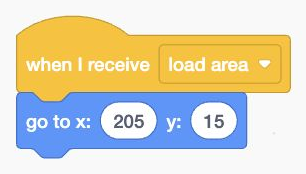
- Add: Build these blocks in this order
Actual Scratch editor · step 20 Select Portal
Reveal Portal after a victory
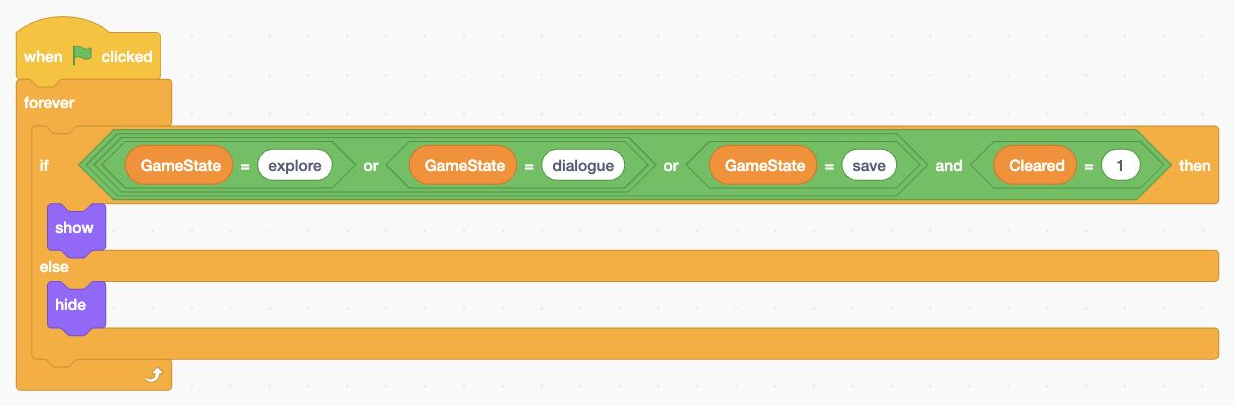
Build Portal’s pictured visibility loop. Require Cleared = 1 and GameState equal to explore, dialogue or save. The save state is for next lesson’s code screen. Otherwise hide.
- Add: Build these blocks in this order
Actual Scratch editor · step 21 Select Stage’s thumbnail
Earn one crystal per area
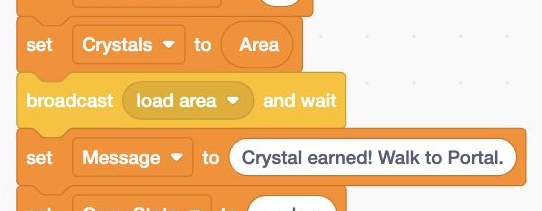
Select Stage’s battle won stack. Add set Crystals to Area before load area. Change Message to Crystal earned! Walk to Portal. Cleared stays 1, preventing another reward from this foe.
- Add: Add or update the highlighted blocks
Actual Scratch editor · step 22 Select Guide
Point the player toward Portal
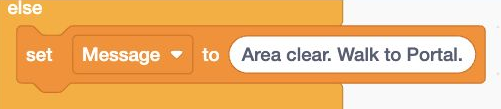
In Guide’s YES branch, change the already-cleared reply to Area clear. Walk to Portal. Keep the existing check that only an unbeaten area can accept a quest.
- Add: Add or update the highlighted blocks
Actual Scratch editor · step 23 Select Hero
Detect entering Portal
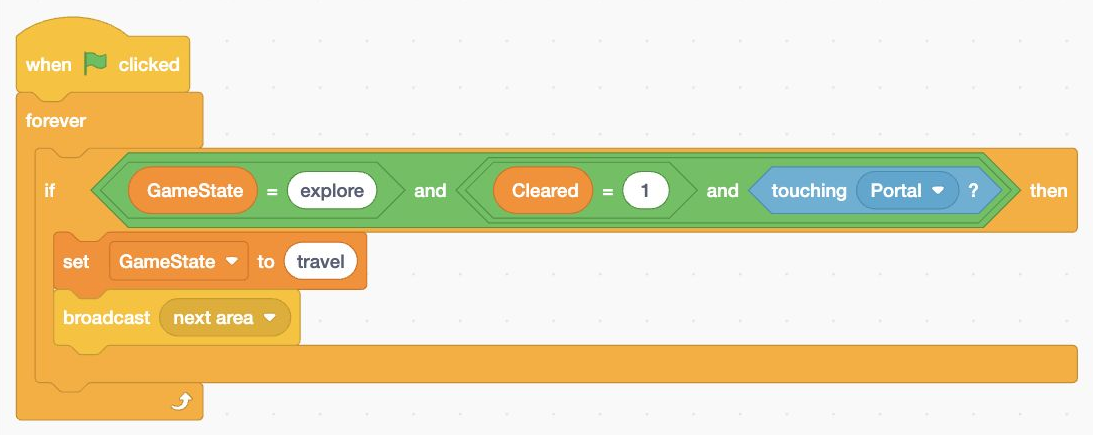
Select Hero. Build the pictured green-flag loop. If GameState = explore, Cleared = 1 and touching Portal, set GameState to travel and broadcast next area.
- Add: Build these blocks in this order
Actual Scratch editor · step 24 Select Stage’s thumbnail
Prepare the next area
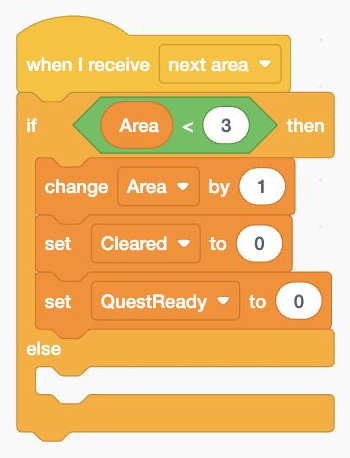
Select Stage. Begin when I receive next area. Inside if Area < 3, change Area by 1, set Cleared to 0 and set QuestReady to 0. Put the following travel blocks in this same slot.
- Add: Add or update the highlighted blocks
Actual Scratch editor · step 25 Select Stage’s thumbnail
Increase strength and load the map
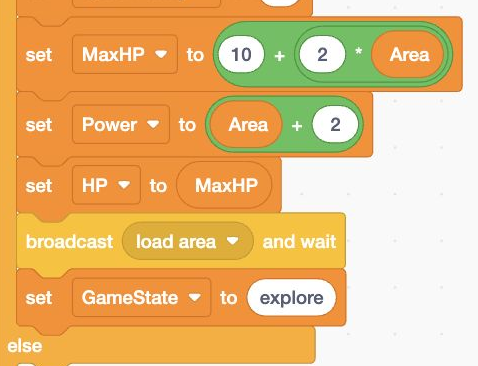
Continue that first slot. Recalculate MaxHP as 10 + (2 × Area) and Power as Area + 2. Set HP to MaxHP, broadcast load area and wait, then set GameState to explore. Keep Potions unchanged.
- Add: Add or update the highlighted blocks
Actual Scratch editor · step 26 Select Stage’s thumbnail
Finish after the final crystal
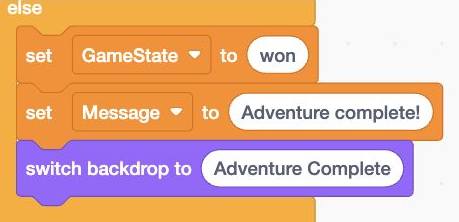
In that if’s else slot, set GameState to won, set Message to Adventure complete!, and switch backdrop to Adventure Complete. This slot runs when Area is already 3.
- Add: Add or update the highlighted blocks
Actual Scratch editor · step 27 Select Menu
Show Menu after winning too
Select Menu’s visibility loop. Change its condition to GameState = lost or GameState = won. The same button now works on both ending screens.

- Add: Add or update the highlighted blocks
Actual Scratch editor · step 28 Select Menu
Allow the winning Menu click
Update Menu’s click-stack condition to the same lost or won test. Keep set GameState to leaving and broadcast show menu inside it.

- Add: Add or update the highlighted blocks
Actual Scratch editor · step 29 Select Stage’s thumbnail
Test the first portal
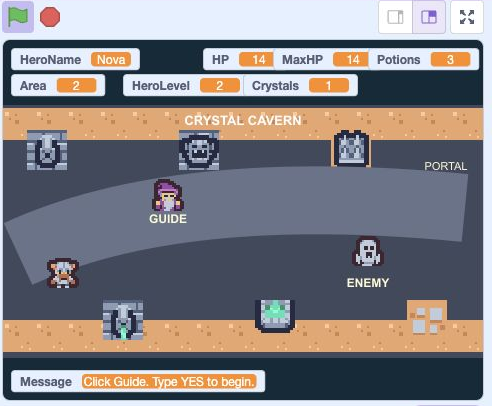
Drag Area, HeroLevel and Crystals onto the second row, matching the picture. Win in Meadow Trail, then enter Portal. Crystal Cavern loads with the skeleton: Area and HeroLevel become 2, HP is 14, and Potions keeps its earlier count.
- Click: Run your test with the green flag
- Check: Arrange these counters to match
- Check: Read the Message after testing
Actual Scratch editor · step 30 Select Stage’s thumbnail
Test the final challenge
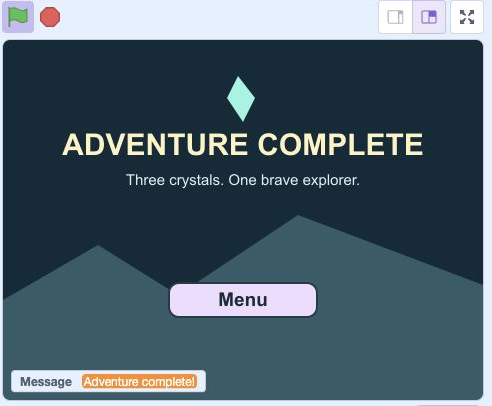
Earn the second crystal, then enter Ancient Ruins. Use REST if you need a potion, then accept the bat quest. Attack three times, Heal, then finish the fight. Earn crystal 3 and enter Portal. Adventure Complete should appear.
- Click: Run your test with the green flag
- Check: Check the Adventure Complete screen
- Click: Click Menu to play again
Actual Scratch editor · step 31
Optional: full block guide and lesson comparison
Save your own project first. Loading an .sb3 replaces the project on screen. This comparison shows the end of lesson 8.
Download lesson 8 comparison · Download all lesson comparisons
Choose the named sprite in Scratch and read its blocks from top to bottom. Indented rows fit inside the block above. Keep one copy of each existing stack.
StageOpen the title screen
- Eventswhen green flag clicked
- Variablesset [GameState] to (menu)
- Looksswitch backdrop to [Title Screen]
- Variablesset [HeroName] to (Explorer)
- Variablesset [Message] to ()
- Variablesset [QuestReady] to (0)
- Variablesset [Area] to (1)
- Variablesset [Cleared] to (0)
- Variablesset [MaxHP] to ((10) + ((2) * (Area)))
- Variablesset [Power] to ((Area) + (2))
- Variablesset [HP] to (MaxHP)
- Variablesset [EnemyHP] to (0)
- Variablesset [EnemyPower] to (0)
- Variablesset [Potions] to (3)
- Variablesset [HeroLevel] to (1)
- Variablesset [Crystals] to (0)
StageReset progress and begin
- Eventswhen I receive [new game]
- Variablesset [QuestReady] to (0)
- Variablesset [Area] to (1)
- Variablesset [Cleared] to (0)
- Variablesset [MaxHP] to ((10) + ((2) * (Area)))
- Variablesset [Power] to ((Area) + (2))
- Variablesset [HP] to (MaxHP)
- Variablesset [EnemyHP] to (0)
- Variablesset [EnemyPower] to (0)
- Variablesset [Potions] to (3)
- Variablesset [HeroLevel] to (1)
- Variablesset [Crystals] to (0)
- Eventsbroadcast [ask hero name] and wait
- Eventsbroadcast [load area] and wait
- Variablesset [GameState] to (explore)
StageShow the current area
- Eventswhen I receive [load area]
- Controlif <Area = 1> then
- Looksswitch backdrop to [Meadow Trail]
- elseSecond slot of the same if/else blockControlif <Area = 2> then
- Looksswitch backdrop to [Crystal Cavern]
- elseSecond slot of the same if/else blockLooksswitch backdrop to [Ancient Ruins]
- Variablesset [Message] to (Click Guide. Type YES to begin.)
- Variablesset [HeroLevel] to (Area)
- Variablesset [Crystals] to (((Area) - (1)) + (Cleared))
StageAsk for a short hero nickname
- Eventswhen I receive [ask hero name]
- Variablesset [GameState] to (naming)
- Sensingask [Choose a made-up hero nickname (1–12 letters).] and wait
- Variablesset [HeroName] to (answer)
- Controlif <<length of [HeroName] = 0> or <length of [HeroName] > 12>> then
- Variablesset [HeroName] to (Explorer)
StageShow information only while playing
- Eventswhen green flag clicked
- Controlforever
- Controlif <<<GameState = explore> or <GameState = dialogue>> or <<<GameState = battle> or <GameState = turn>> or <GameState = loading>>> then
- Variablesshow variable [HeroName]
- Variablesshow variable [HP]
- Variablesshow variable [MaxHP]
- Variablesshow variable [Potions]
- Variablesshow variable [Area]
- Variablesshow variable [HeroLevel]
- Variablesshow variable [Crystals]
- elseSecond slot of the same if/else blockVariableshide variable [HeroName]
- Variableshide variable [HP]
- Variableshide variable [MaxHP]
- Variableshide variable [Potions]
- Variableshide variable [Area]
- Variableshide variable [HeroLevel]
- Variableshide variable [Crystals]
- Controlif <not <Message = >> then
- Variablesshow variable [Message]
- elseSecond slot of the same if/else blockVariableshide variable [Message]
- Controlif <<GameState = battle> or <GameState = turn>> then
- Variablesshow variable [EnemyHP]
- elseSecond slot of the same if/else blockVariableshide variable [EnemyHP]
StageSet up a fair battle
- Eventswhen I receive [start battle]
- Variablesset [GameState] to (turn)
- Variablesset [EnemyHP] to ((8) * (Area))
- Variablesset [EnemyPower] to ((Area) + (1))
- Looksswitch backdrop to [Battle Arena]
- Variablesset [Message] to (Choose one battle action.)
- Variablesset [GameState] to (battle)
StageAttack once, then give the enemy a turn
- Eventswhen I receive [hero attack]
- Variableschange [EnemyHP] by ((0) - (Power))
- Controlif <EnemyHP < 0> then
- Variablesset [EnemyHP] to (0)
- Variablesset [Message] to (Your hero attacks!)
- Eventsbroadcast [enemy hurt] and wait
- Controlif <EnemyHP < 1> then
- Eventsbroadcast [battle won]
- elseSecond slot of the same if/else blockEventsbroadcast [enemy turn]
StageResolve one enemy attack
- Eventswhen I receive [enemy turn]
- Controlwait (0.25) seconds
- Variableschange [HP] by ((0) - (EnemyPower))
- Controlif <HP < 0> then
- Variablesset [HP] to (0)
- Variablesset [Message] to (The enemy strikes back!)
- Eventsbroadcast [hero hurt] and wait
- Controlif <HP < 1> then
- Variablesset [GameState] to (lost)
- Looksswitch backdrop to [Try Again]
- elseSecond slot of the same if/else blockVariablesset [Message] to (Your turn: Attack, Heal or Run.)
- Variablesset [GameState] to (battle)
StageClear the area once
- Eventswhen I receive [battle won]
- Variablesset [Cleared] to (1)
- Variablesset [QuestReady] to (0)
- Variablesset [Crystals] to (Area)
- Eventsbroadcast [load area] and wait
- Variablesset [Message] to (Crystal earned! Walk to Portal.)
- Variablesset [GameState] to (explore)
StageUse one potion and give the enemy a turn
- Eventswhen I receive [heal hero]
- Variableschange [Potions] by (-1)
- Variableschange [HP] by (6)
- Controlif <HP > MaxHP> then
- Variablesset [HP] to (MaxHP)
- Variablesset [Message] to (Potion restores up to 6 HP.)
- Controlwait (0.3) seconds
- Eventsbroadcast [enemy turn]
StageRetreat without earning a crystal
- Eventswhen I receive [run away]
- Eventsbroadcast [load area] and wait
- Variablesset [Message] to (Retreated. HP and potions stay.)
- Variablesset [GameState] to (explore)
StageReturn to the title screen
- Eventswhen I receive [show menu]
- Variablesset [GameState] to (menu)
- Looksswitch backdrop to [Title Screen]
- Variablesset [Message] to ()
StageTravel onward or finish the adventure
- Eventswhen I receive [next area]
- Controlif <Area < 3> then
- Variableschange [Area] by (1)
- Variablesset [Cleared] to (0)
- Variablesset [QuestReady] to (0)
- Variablesset [MaxHP] to ((10) + ((2) * (Area)))
- Variablesset [Power] to ((Area) + (2))
- Variablesset [HP] to (MaxHP)
- Eventsbroadcast [load area] and wait
- Variablesset [GameState] to (explore)
- elseSecond slot of the same if/else blockVariablesset [GameState] to (won)
- Variablesset [Message] to (Adventure complete!)
- Looksswitch backdrop to [Adventure Complete]
StartShow New Game on the title screen
- Eventswhen green flag clicked
- Controlforever
- Controlif <GameState = menu> then
- Looksshow
- elseSecond slot of the same if/else blockLookshide
StartLock New Game before starting
- Eventswhen this sprite clicked
- Controlif <GameState = menu> then
- Variablesset [GameState] to (loading)
- Eventsbroadcast [new game]
HeroPlace the hero at a safe starting point
- Eventswhen I receive [load area]
- Looksclear graphic effects
- Motiongo to x: (-180) y: (-80)
- Variablesset [XSpeed] to (0)
- Variablesset [YSpeed] to (0)
- Variablesset [AnimTicks] to (0)
- Looksswitch costume to [Stand]
- Motionset rotation style [left-right]
- Motionpoint in direction (90)
HeroShow the hero only inside the adventure
- Eventswhen green flag clicked
- Controlforever
- Controlif <<<GameState = explore> or <GameState = dialogue>> or <<GameState = battle> or <GameState = turn>>> then
- Looksshow
- elseSecond slot of the same if/else blockLookshide
HeroRead arrow keys and move in four directions
- Eventswhen green flag clicked
- Controlforever
- Controlif <GameState = explore> then
- Variablesset [XSpeed] to (0)
- Variablesset [YSpeed] to (0)
- Controlif <key [left arrow] pressed?> then
- Variableschange [XSpeed] by (-4)
- Controlif <key [right arrow] pressed?> then
- Variableschange [XSpeed] by (4)
- Controlif <key [up arrow] pressed?> then
- Variableschange [YSpeed] by (4)
- Controlif <key [down arrow] pressed?> then
- Variableschange [YSpeed] by (-4)
- Motionchange x by (XSpeed)
- Motionchange y by (YSpeed)
- My Blocksstay on map
HeroStay inside the map
- My Blocksdefine stay on map
- Controlif <x position > 215> then
- Motionset x to (215)
- Controlif <x position < -215> then
- Motionset x to (-215)
- Controlif <y position > 85> then
- Motionset y to (85)
- Controlif <y position < -120> then
- Motionset y to (-120)
HeroFace the way you move and animate your feet
- Eventswhen green flag clicked
- Controlforever
- Controlif <GameState = explore> then
- Controlif <XSpeed < 0> then
- Motionpoint in direction (-90)
- Controlif <XSpeed > 0> then
- Motionpoint in direction (90)
- Controlif <<XSpeed = 0> and <YSpeed = 0>> then
- Looksswitch costume to [Stand]
- Variablesset [AnimTicks] to (0)
- elseSecond slot of the same if/else blockVariableschange [AnimTicks] by (1)
- Controlif <AnimTicks > 3> then
- Looksnext costume
- Variablesset [AnimTicks] to (0)
HeroStand on the left for battle
- Eventswhen I receive [start battle]
- Motiongo to x: (-105) y: (-15)
- Looksswitch costume to [Stand]
- Motionpoint in direction (90)
HeroBegin a quest battle by touching the enemy
- Eventswhen green flag clicked
- Controlforever
- Controlif <<GameState = explore> and <<<QuestReady = 1> and <Cleared = 0>> and <touching [Enemy]?>>> then
- Variablesset [GameState] to (loading battle)
- Eventsbroadcast [start battle]
HeroFlash when the enemy hits
- Eventswhen I receive [hero hurt]
- Looksset [color] effect to (40)
- Motionchange x by (-6)
- Controlwait (0.12) seconds
- Motionchange x by (6)
- Looksclear graphic effects
HeroEnter the portal after earning a crystal
- Eventswhen green flag clicked
- Controlforever
- Controlif <<GameState = explore> and <<Cleared = 1> and <touching [Portal]?>>> then
- Variablesset [GameState] to (travel)
- Eventsbroadcast [next area]
GuidePlace the guide beside the path
- Eventswhen I receive [load area]
- Motiongo to x: (-75) y: (25)
GuideShow the guide on the map
- Eventswhen green flag clicked
- Controlforever
- Controlif <<GameState = explore> or <GameState = dialogue>> then
- Looksshow
- elseSecond slot of the same if/else blockLookshide
GuideListen to the player’s typed choice
- Eventswhen this sprite clicked
- Controlif <GameState = explore> then
- Variablesset [GameState] to (dialogue)
- Sensingask [Type YES for quest, HINT for help, or REST to recover.] and wait
- Controlif <answer = YES> then
- Controlif <Cleared = 0> then
- Variablesset [QuestReady] to (1)
- Variablesset [Message] to (Walk to the monster to battle.)
- elseSecond slot of the same if/else blockVariablesset [Message] to (Area clear. Walk to Portal.)
- elseSecond slot of the same if/else blockControlif <answer = HINT> then
- Variablesset [Message] to (Arrows move. Touch foe after YES.)
- elseSecond slot of the same if/else blockControlif <answer = REST> then
- Variablesset [HP] to (MaxHP)
- Controlif <Potions = 0> then
- Variablesset [Potions] to (1)
- Variablesset [Message] to (Rested! At least one potion ready.)
- elseSecond slot of the same if/else blockVariablesset [Message] to (Try YES, HINT or REST.)
- Variablesset [GameState] to (explore)
EnemyChoose the monster for this area
- Eventswhen I receive [load area]
- Looksclear graphic effects
- Motiongo to x: (125) y: (-30)
- Variablesset [AnimTicks] to (0)
- Controlif <Area = 1> then
- Looksswitch costume to [Slime 1]
- elseSecond slot of the same if/else blockControlif <Area = 2> then
- Looksswitch costume to [Skeleton 1]
- elseSecond slot of the same if/else blockLooksswitch costume to [Bat 1]
EnemyHide a defeated enemy
- Eventswhen green flag clicked
- Controlforever
- Controlif <<<<<GameState = explore> or <GameState = dialogue>> or <GameState = loading battle>> and <Cleared = 0>> or <<GameState = battle> or <GameState = turn>>> then
- Looksshow
- elseSecond slot of the same if/else blockLookshide
EnemyBlink while waiting for the hero
- Eventswhen green flag clicked
- Controlforever
- Controlif <<GameState = explore> or <GameState = battle>> then
- Variableschange [AnimTicks] by (1)
- Controlif <AnimTicks = 18> then
- Looksnext costume
- Controlif <AnimTicks > 21> then
- Controlif <Area = 1> then
- Looksswitch costume to [Slime 1]
- elseSecond slot of the same if/else blockControlif <Area = 2> then
- Looksswitch costume to [Skeleton 1]
- elseSecond slot of the same if/else blockLooksswitch costume to [Bat 1]
- Variablesset [AnimTicks] to (0)
EnemyFace the hero across the battle arena
- Eventswhen I receive [start battle]
- Motiongo to x: (105) y: (-15)
- Controlif <Area = 1> then
- Looksswitch costume to [Slime 1]
- elseSecond slot of the same if/else blockControlif <Area = 2> then
- Looksswitch costume to [Skeleton 1]
- elseSecond slot of the same if/else blockLooksswitch costume to [Bat 1]
EnemyFlash and recoil when hit
- Eventswhen I receive [enemy hurt]
- Looksset [color] effect to (40)
- Motionchange x by (6)
- Controlwait (0.12) seconds
- Motionchange x by (-6)
- Looksclear graphic effects
PortalPlace the portal at the right edge
- Eventswhen I receive [load area]
- Motiongo to x: (205) y: (15)
PortalShow the portal only after the battle is won
- Eventswhen green flag clicked
- Controlforever
- Controlif <<<<GameState = explore> or <GameState = dialogue>> or <GameState = save>> and <Cleared = 1>> then
- Looksshow
- elseSecond slot of the same if/else blockLookshide
AttackShow Attack when it can be used
- Eventswhen green flag clicked
- Controlforever
- Controlif <GameState = battle> then
- Looksshow
- elseSecond slot of the same if/else blockLookshide
AttackUse Attack once per turn
- Eventswhen this sprite clicked
- Controlif <GameState = battle> then
- Variablesset [GameState] to (turn)
- Eventsbroadcast [hero attack]
HealShow Heal when it can be used
- Eventswhen green flag clicked
- Controlforever
- Controlif <GameState = battle> then
- Looksshow
- elseSecond slot of the same if/else blockLookshide
HealUse Heal once per turn
- Eventswhen this sprite clicked
- Controlif <GameState = battle> then
- Controlif <<Potions > 0> and <HP < MaxHP>> then
- Variablesset [GameState] to (turn)
- Eventsbroadcast [heal hero]
- elseSecond slot of the same if/else blockVariablesset [Message] to (Need missing HP and a potion.)
RunShow Run when it can be used
- Eventswhen green flag clicked
- Controlforever
- Controlif <GameState = battle> then
- Looksshow
- elseSecond slot of the same if/else blockLookshide
RunUse Run once per turn
- Eventswhen this sprite clicked
- Controlif <GameState = battle> then
- Variablesset [GameState] to (retreat)
- Eventsbroadcast [run away]
MenuShow Menu when it can be used
- Eventswhen green flag clicked
- Controlforever
- Controlif <<GameState = lost> or <GameState = won>> then
- Looksshow
- elseSecond slot of the same if/else blockLookshide
MenuKeep Menu clear of the save code
- Eventswhen green flag clicked
- Controlforever
- Motiongo to x: (0) y: (-80)
MenuUse Menu once per turn
- Eventswhen this sprite clicked
- Controlif <<GameState = lost> or <GameState = won>> then
- Variablesset [GameState] to (leaving)
- Eventsbroadcast [show menu]
Ready for the next step?
Return here anytime to review.
Lesson discussion
Ask a question or help a classmate. Mr. S can reply here.
Loading discussion…