
Test, Customize, and Explain the Adventure
- Finish the Adventure
- 30 minutes
- Advanced Scratch · Ages 8–11
Open Space Rescue 7. Play through the whole adventure, fix one thing at a time, then save your finished game.
Prerequisite: Scratch Meteor Challenge. Complete Meteor Challenge before adding rescue missions, custom blocks, and clones.
Your goal
Test pickups, deliveries, lives, the clock, missions and restart.
Do one step. Match the picture. Then move on.
In Scratch
Check the first mission
Click the green flag. Check Goal 2, Lives 3, TimeLeft 45, Carrying 0 and TotalRescued 0. There should be one falling meteor.
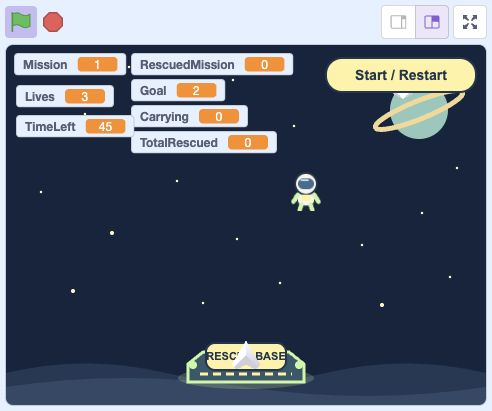
- Click: Click the green flag for the final checks.
Actual Scratch editor · step 1 In Scratch
Check all four directions
Try every arrow and each screen edge. The ship should stay on screen. If one direction is wrong, check the two numbers in its move ship call.
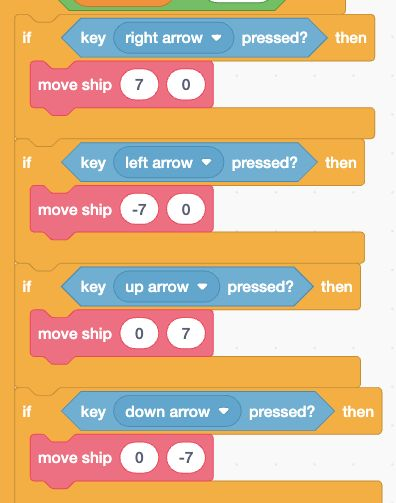
- Check: Check both inputs in all four movement calls.
Actual Scratch editor · step 2 In Scratch
Check one pickup and delivery
Touch an astronaut, then return to base. Carrying should go 0 → 1 → 0. Each rescue counter should increase only once for that passenger.
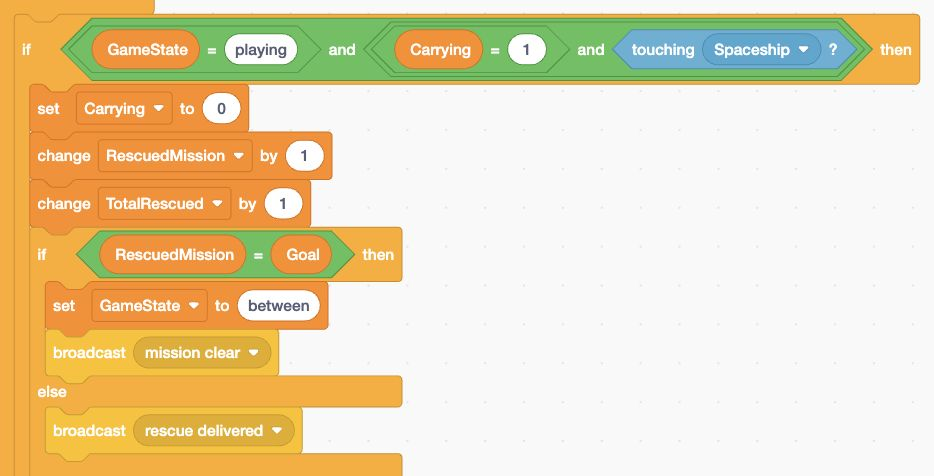
- Check: Check that one delivery changes the counters once.
Actual Scratch editor · step 3 In Scratch
Check hits and protection
Touch a meteor. Lose one life, then get about one second of protection. After three separate hits, Out of lives should appear. Restart must still work.
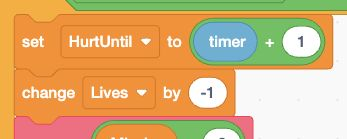
- Check: Check the one-second HurtUntil protection.
Actual Scratch editor · step 4 In Scratch
Check the clock
Restart and let the clock expire without completing the goal. Check Time is up and TimeLeft 0. Restart again: the clock returns to 45.
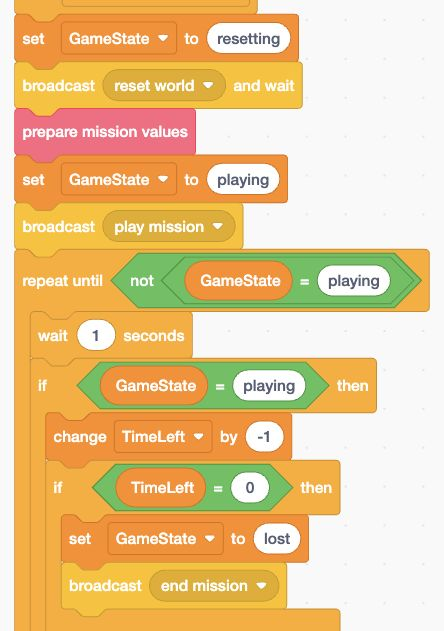
- Check: Check the TimeLeft zero ending.
Actual Scratch editor · step 5 In Scratch
Check all three missions
Complete goals 2, 3 and 4. Check meteor counts 1, 2 and 3. Click Next Mission only on Mission complete. After mission 3, Adventure complete appears.
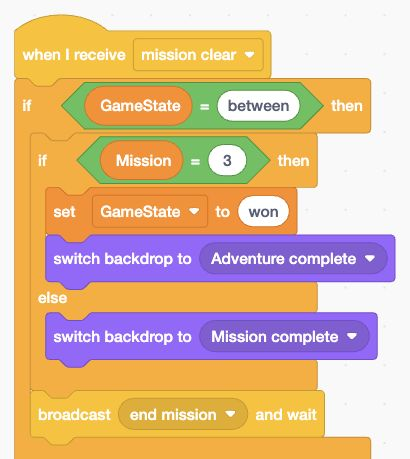
- Check: Check the success choice after each mission.
Actual Scratch editor · step 6 In Scratch
Check the final log
The final log should have three rows and TotalRescued should be 9. Start a new game: both the log and rescue total should clear.
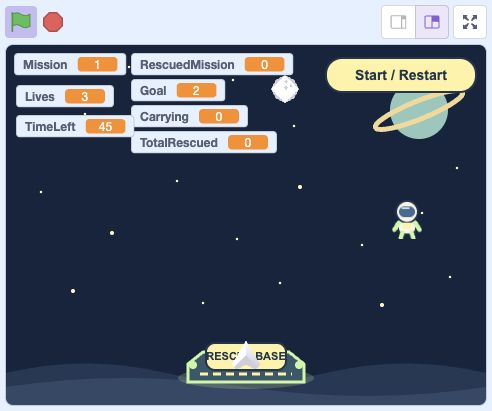
- Check: Watch TotalRescued while completing the three missions.
- Click: Restart to clear the total and log.
Actual Scratch editor · step 7 In Scratch
Try repeated restarts
Restart several times during play, between missions and after losing. Old meteors must disappear; the new first mission should still have only one meteor.
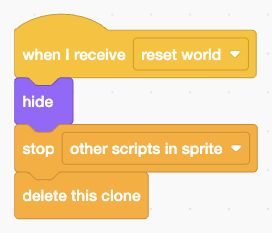
- Check: Check that resets delete old meteor clones.
Actual Scratch editor · step 8 Select Meteor
Try one small change
Save a working copy first. Change Mission + 3 to Mission + 2 in all three respawn calls in the clone stack. Meteors fall more slowly. Test every mission before keeping the change.
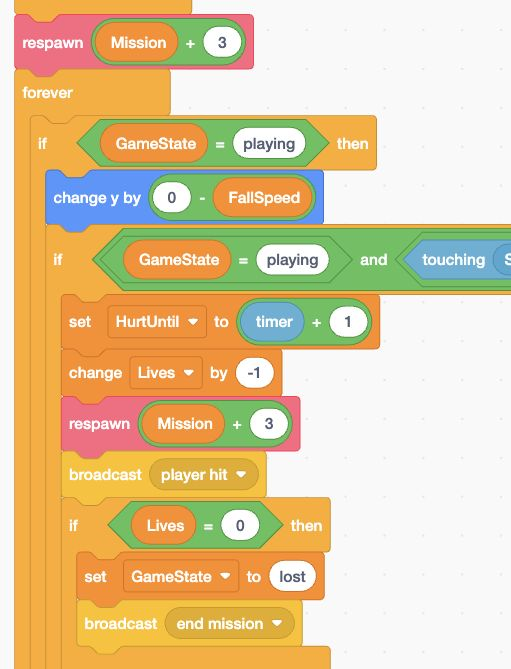
- Add: Change this speed to Mission + 2.
- Add: Change this respawn speed too.
Actual Scratch editor · step 9 In Scratch
Save the finished adventure
Choose File → Save to your computer. Name it Space Rescue Finished.sb3. Keep a separate copy of your last working version too.
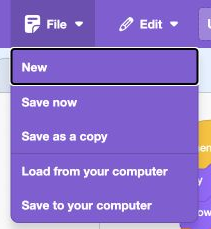
- Click: Open File.
- Click: Choose Save to your computer.
Actual Scratch editor · step 10 In Scratch
Share and ask for a play test
If signed in, choose Share at the top of Scratch. Give a friend the project link. Ask them to test pickups, deliveries, lives, the clock and both buttons.

- Click: Choose Share only when your project is ready.
Actual Scratch editor · step 11
Lost your place? Optional comparison files
Save your own work first. Loading an .sb3 replaces the project on screen.
Optional: full block guide and finished game
Build with blocks · Lesson 8
See the blocks. Try the finished game.
Build these blocks in Scratch. This guide is read-only.
Your lesson’s block guide
Choose the matching sprite in Scratch, then build its stack from top to bottom.
Indented rows fit inside the block above. else marks the second slot of one if/else block.
My Blocks inputs pass values into one call. FallSpeed belongs to each meteor clone; MissionLog is a shared list for the current adventure.
StageStage: define prepare mission values
- My Blocksdefine prepare mission values
- Variablesset [Goal] to (Mission + 1)
- Variablesset [RescuedMission] to (0)
- Variablesset [Carrying] to (0)
- Variablesset [HurtUntil] to (0)
- Variablesset [TimeLeft] to (45)
- Variableshide list [MissionLog]
- Controlif <Mission = 1> then
- Looksswitch backdrop to [Mission 1]
- elseSecond slot of the same if/else blockControlif <Mission = 2> then
- Looksswitch backdrop to [Mission 2]
- elseSecond slot of the same if/else blockLooksswitch backdrop to [Mission 3]
StageStage: when green flag clicked
- Eventswhen green flag clicked
- Eventsbroadcast [new game]
StageStage: when I receive [new game]
- Eventswhen I receive [new game]
- Controlstop [other scripts in sprite]
- Variablesset [GameState] to (resetting)
- Variablesset [Mission] to (1)
- Variablesset [TotalRescued] to (0)
- Variablesset [Lives] to (3)
- Sensingreset timer
- Variablesdelete all of [MissionLog]
- Eventsbroadcast [prepare mission]
StageStage: when I receive [prepare mission]
- Eventswhen I receive [prepare mission]
- Controlstop [other scripts in sprite]
- Variablesset [GameState] to (resetting)
- Eventsbroadcast [reset world] and wait
- My Blockscall prepare mission values
- Variablesset [GameState] to (playing)
- Eventsbroadcast [play mission]
- Controlrepeat until <not <GameState = playing>>
- Controlwait (1) seconds
- Controlif <GameState = playing> then
- Variableschange [TimeLeft] by (-1)
- Controlif <TimeLeft = 0> then
- Variablesset [GameState] to (lost)
- Eventsbroadcast [end mission]
StageStage: when I receive [mission clear]
- Eventswhen I receive [mission clear]
- Controlif <GameState = between> then
- Variablesadd [join [Mission ] [join [Mission] [join [: ] [join [RescuedMission] [ rescued]]]]] to [MissionLog]
- Controlif <Mission = 3> then
- Variablesset [GameState] to (won)
- Looksswitch backdrop to [Adventure complete]
- elseSecond slot of the same if/else blockLooksswitch backdrop to [Mission complete]
- Eventsbroadcast [end mission] and wait
- Variablesshow list [MissionLog]
StageStage: when I receive [end mission]
- Eventswhen I receive [end mission]
- Controlif <GameState = lost> then
- Controlif <Lives = 0> then
- Looksswitch backdrop to [Out of lives]
- elseSecond slot of the same if/else blockLooksswitch backdrop to [Time is up]
- Variablesshow list [MissionLog]
StageStage: when I receive [next mission]
- Eventswhen I receive [next mission]
- Controlif <GameState = between> then
- Variablesset [GameState] to (resetting)
- Variableschange [Mission] by (1)
- Eventsbroadcast [prepare mission]
SpaceshipSpaceship: define move ship (dx) (dy)
- My Blocksdefine move ship (dx) (dy)
- Motionchange x by (dx)
- Motionchange y by (dy)
- Controlif <x position > 210> then
- Motionset x to (210)
- Controlif <x position < -210> then
- Motionset x to (-210)
- Controlif <y position > 125> then
- Motionset y to (125)
- Controlif <y position < -155> then
- Motionset y to (-155)
SpaceshipSpaceship: when I receive [reset world]
- Eventswhen I receive [reset world]
- Controlstop [other scripts in sprite]
- Lookshide
- Lookssay []
- Looksclear graphic effects
- Motiongo to x: (0) y: (-130)
SpaceshipSpaceship: when I receive [play mission]
- Eventswhen I receive [play mission]
- Looksshow
- Controlforever
- Controlif <GameState = playing> then
- Controlif <key [right arrow] pressed?> then
- My Blockscall move ship (7) (0)
- Controlif <key [left arrow] pressed?> then
- My Blockscall move ship (-7) (0)
- Controlif <key [up arrow] pressed?> then
- My Blockscall move ship (0) (7)
- Controlif <key [down arrow] pressed?> then
- My Blockscall move ship (0) (-7)
- Controlif <Carrying = 1> then
- Lookssay [Passenger aboard!]
- elseSecond slot of the same if/else blockLookssay []
- Controlif <timer < HurtUntil> then
- Looksset [ghost] effect to (45)
- elseSecond slot of the same if/else blockLooksclear graphic effects
SpaceshipSpaceship: when I receive [end mission]
- Eventswhen I receive [end mission]
- Controlstop [other scripts in sprite]
- Lookshide
- Lookssay []
- Looksclear graphic effects
SpaceshipSpaceship: when I receive [player hit]
- Eventswhen I receive [player hit]
- Soundstart sound [Hit]
AstronautAstronaut: when I receive [reset world]
- Eventswhen I receive [reset world]
- Controlstop [other scripts in sprite]
- Lookshide
- Lookssay []
- Motiongo to x: (pick random (-190) to (190)) y: (pick random (0) to (45))
AstronautAstronaut: when I receive [play mission]
- Eventswhen I receive [play mission]
- Looksshow
- Controlforever
- Controlif <<GameState = playing> and <<Carrying = 0> and <touching [Spaceship]?>>> then
- Variablesset [Carrying] to (1)
- Lookshide
- Soundstart sound [Rescue]
AstronautAstronaut: when I receive [rescue delivered]
- Eventswhen I receive [rescue delivered]
- Controlif <GameState = playing> then
- Motiongo to x: (pick random (-190) to (190)) y: (pick random (0) to (45))
- Looksshow
AstronautAstronaut: when I receive [end mission]
- Eventswhen I receive [end mission]
- Controlstop [other scripts in sprite]
- Lookshide
BaseStationBaseStation: when I receive [reset world]
- Eventswhen I receive [reset world]
- Controlstop [other scripts in sprite]
- Lookshide
- Motiongo to x: (0) y: (-140)
BaseStationBaseStation: when I receive [play mission]
- Eventswhen I receive [play mission]
- Looksshow
- Controlforever
- Controlif <<GameState = playing> and <<Carrying = 1> and <touching [Spaceship]?>>> then
- Variablesset [Carrying] to (0)
- Variableschange [RescuedMission] by (1)
- Variableschange [TotalRescued] by (1)
- Controlif <RescuedMission = Goal> then
- Variablesset [GameState] to (between)
- Eventsbroadcast [mission clear]
- elseSecond slot of the same if/else blockEventsbroadcast [rescue delivered]
- Soundstart sound [Rescue]
BaseStationBaseStation: when I receive [end mission]
- Eventswhen I receive [end mission]
- Controlstop [other scripts in sprite]
- Lookshide
MeteorMeteor: define respawn (speed)
- My Blocksdefine respawn (speed)
- Variablesset [FallSpeed · this sprite only] to (speed)
- Motiongo to x: (pick random (-205) to (205)) y: (180)
- Looksshow
MeteorMeteor: when I receive [reset world]
- Eventswhen I receive [reset world]
- Lookshide
- Controlstop [other scripts in sprite]
- Controldelete this clone
MeteorMeteor: when I receive [end mission]
- Eventswhen I receive [end mission]
- Lookshide
- Controlstop [other scripts in sprite]
- Controldelete this clone
MeteorMeteor: when I receive [play mission]
- Eventswhen I receive [play mission]
- Lookshide
- Controlrepeat (Mission)
- Controlcreate clone of [myself]
MeteorMeteor: when I start as a clone
- Controlwhen I start as a clone
- My Blockscall respawn (Mission + 3)
- Controlforever
- Controlif <GameState = playing> then
- Motionchange y by (0 - FallSpeed)
- Controlif <<GameState = playing> and <<touching [Spaceship]?> and <timer > HurtUntil>>> then
- Variablesset [HurtUntil] to (timer + 1)
- Variableschange [Lives] by (-1)
- My Blockscall respawn (Mission + 3)
- Eventsbroadcast [player hit]
- Controlif <Lives = 0> then
- Variablesset [GameState] to (lost)
- Eventsbroadcast [end mission]
- Controlif <<GameState = playing> and <y position < -175>> then
- My Blockscall respawn (Mission + 3)
Start / RestartStart / Restart: when green flag clicked
- Eventswhen green flag clicked
- Motiongo to x: (155) y: (150)
- Looksshow
Start / RestartStart / Restart: when this sprite clicked
- Eventswhen this sprite clicked
- Eventsbroadcast [new game]
Next MissionNext Mission: when green flag clicked
- Eventswhen green flag clicked
- Motiongo to x: (145) y: (-140)
- Lookshide
Next MissionNext Mission: when I receive [reset world]
- Eventswhen I receive [reset world]
- Controlstop [other scripts in sprite]
- Lookshide
Next MissionNext Mission: when I receive [end mission]
- Eventswhen I receive [end mission]
- Controlif <GameState = between> then
- Looksshow
- elseSecond slot of the same if/else blockLookshide
Next MissionNext Mission: when this sprite clicked
- Eventswhen this sprite clicked
- Controlif <GameState = between> then
- Eventsbroadcast [next mission]
Save your current Scratch project first. Then choose File → Load from your computer and select this .sb3 file.
Open the Scratch editor ↗Opening the editor does not load the download automatically.
Finished game preview
This is the completed game, including features from later lessons. It does not run this lesson’s checkpoint.
Choose the green flag, then use all four arrow keys inside the Scratch player. Open your checkpoint in Scratch to test the blocks for this lesson.
Open the finished game in a new tab ↗Ready for the next step?
Return here anytime to review.
Finished project
Space Rescue Adventure
Pilot your spaceship with all four arrow keys, pick up astronauts, and return them to the station. Complete three rescue missions while avoiding cloned meteors and managing your lives and mission timer.
Compare this working example with your own project. It opens in a new tab.
Lesson discussion
Ask a question or help a classmate. Mr. S can reply here.
Loading discussion…